
Vector Equations of 2 Lines in 3D
Loading the math board and drawing, please wait…
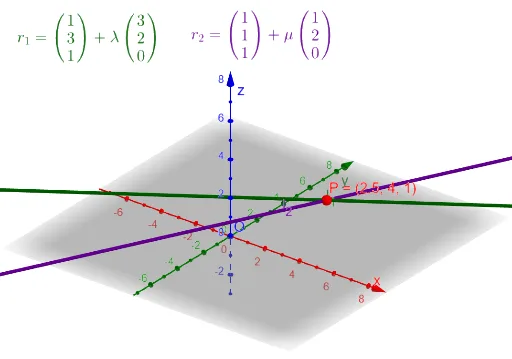
This GeoGebra example demonstrates the vector equations of two lines in three-dimensional space, allowing users to dynamically adjust the direction and position vectors of each line through input fields. It visually shows how lines are positioned and oriented in 3D, and whether they intersect, are parallel, or are skew. Core mathematical concepts include 3D vectors, parametric line equations, direction vectors, position vectors, and line intersection. The construction uses Textfield and InputBox objects to create six parameter inputs for the direction vector components (a_1,a_2,a_3 and b_1,b_2,b_3), the Vector command to define vectors, Line to generate the lines, CurveCartesian to plot parametric curves, Intersect to find intersection points, and a slider λ to control parameter variation. This is suitable for high school or early college students studying spatial analytic geometry, helping them connect algebraic vector equations with geometric intuition.
GeoGebra Commands & Parameters
Textfield(a_1) → InputBox1Textfield(a_2) → InputBox2Textfield(a_3) → InputBox3Textfield(b_1) → InputBox4Textfield(b_2) → InputBox5Textfield(b_3) → InputBox6Line(A, B) → f_1CurveCartesian(a_1 + (b_1 * t), a_2 + (b_2 * t), a_3 + (b_3 * t), t, -10, 10) → line_1Textfield(c_1) → InputBox7Textfield(c_2) → InputBox8Textfield(c_3) → InputBox9Textfield(d_1) → InputBox10Textfield(d_2) → InputBox11Textfield(d_3) → InputBox12Line(C, D) → f_2CurveCartesian(c_1 + (d_1 * t), c_2 + (d_2 * t), c_3 + (d_3 * t), t, -10, 10) → line_2Vector(O, A) → aVector(A, B) → bVector(O, C) → cVector(C, D) → dIntersect(f_1, f_2) → P