
Vector Equation of a Line in 3D
Loading the math board and drawing, please wait…
In collections
How to (4): Vectors, CAS and 3D views
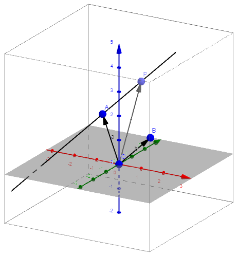
This example demonstrates how to represent a line in three-dimensional space using a vector equation. Key mathematical concepts involved include vectors, three-dimensional coordinate geometry, and parametric equations. The construction utilizes GeoGebra commands such as Vector, Line, and Point, with objects like O (origin), A and B (direction vector start points), a, b, c (parameters), P (any point on the line), and r (radius). It is suitable for high school and above mathematics education, helping students understand and apply the representation of lines in 3D space.
GeoGebra Commands & Parameters
Vector(O, A) → aVector(O, B) → bLine(A, b) → cPoint(c) → PVector(O, P) → r
AI Drawing Prompt Reference
Draw a line in three-dimensional space using a vector equation. First, create a vector a from the origin to point A, then create a vector b from the origin to point B. Next, draw a line c starting from point A with vector b as its direction. Then, take a point P on line c. Finally, draw a vector r from the origin to point P.
The prompt above was compiled from the original drawing commands and is for reference only.