
Vector Dot Product Demo
Loading the math board and drawing, please wait…
In collections
Vector Basics
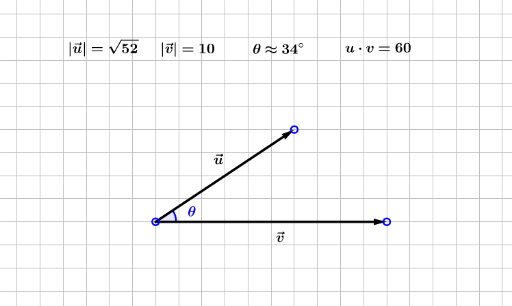
This example demonstrates the calculation and geometric interpretation of the dot product between two vectors, visually showing how the dot product relates to the angle between them through dynamic manipulation. Key mathematical concepts include vector magnitude, angle between vectors, dot product formula, and trigonometric functions. The construction uses GeoGebra commands like Vector, Length, and Angle, with sliders to dynamically adjust vector directions and magnitudes, illustrating the changes in the dot product. Suitable for high school students and above learning vectors and trigonometry, or for university-level physics education.
GeoGebra Commands & Parameters
Vector(A, B) → uLength(u) → MagUVector(A, C) → vAngle(C, A, B) → θ_1Length(v) → MagVAngle(C, A, B) → θ_2Angle(C, A, B) → θ_3
AI Drawing Prompt Reference
Draw two vectors u and v with their starting point at A, ending at B and C respectively. Use sliders to adjust the direction and length of the vectors, and observe the angle θ between them and the angle between points B and C. Calculate and display the lengths of vectors u and v (MagU and MagV), and their dot product.
The prompt above was compiled from the original drawing commands and is for reference only.