
Base 10 Blocks Visualization
Loading the math board and drawing, please wait…
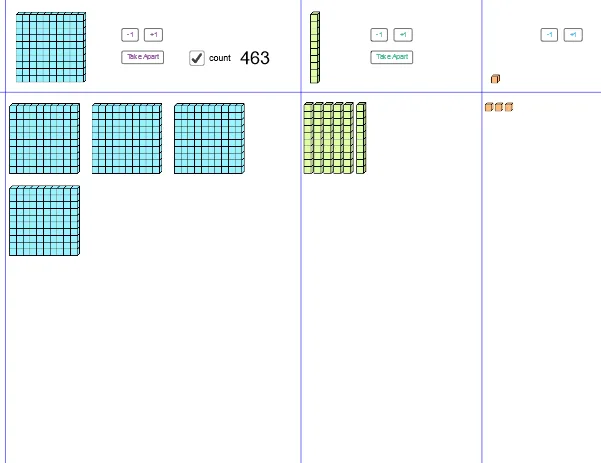
This example demonstrates counting and visualizing base 10 numbers using blocks. It involves core mathematical concepts such as the base 10 number system, digit representation, and basic geometric constructions. Key GeoGebra commands and objects used include Corner, Segment, Intersect, Sequence, First, and objects like pic1, ones, spc, C1, C3, i, width, dst, f, C, list1, list1', A, pic2, tens, h, D, list10, list10', G, pic3, huns, g, I, E, list100, list100', thos, B, F, pic3_1, J, K, L, b100pls1, b100mns1, b100TA, text1, list10b, b100PT. Suitable for elementary students learning the base 10 system and basic geometric constructions.
GeoGebra Commands & Parameters
Corner(1) → C1Corner(3) → C3Segment(((0.2 * x(C1)) + (0.8 * x(C3)), y(C3)), ((0.2 * x(C1)) + (0.8 * x(C3)), y(C1))) → iSegment((x(C1), (0.2 * y(C1)) + (0.8 * y(C3))), (x(C3), (0.2 * y(C1)) + (0.8 * y(C3)))) → fIntersect(f, i) → CSequence(Sequence[Translate[C + (spc, ((-(2 + spc)) * dst)), Vector[(((i * (1 + spc)) * dst), (((-j) * (1 + spc)) * dst) - ((2 * spc) * floor(j / 5)))]], i, 0, 4], j, 0, 24) → list1First(Flatten[list1], Min[125, ones]) → list1'Segment(((0.5 * x(C1)) + (0.5 * x(C3)), y(C3)), ((0.5 * x(C1)) + (0.5 * x(C3)), y(C1))) → hIntersect(f, h) → DSequence(Sequence[Translate[D + (spc, 0), Vector[(((i * (1 + spc)) * dst) + (spc * floor(i / 5)), (((-j) * 9) * dst))]], i, 0, 9], j, 1, 4) → list10First(Flatten[list10], Min[tens, 40]) → list10'Segment(((0.99 * x(C1)) + (0.01 * x(C3)), y(C3)), ((0.99 * x(C1)) + (0.01 * x(C3)), y(C1))) → gIntersect(f, g) → ESequence(Sequence[Translate[E + (spc, 0), Vector[(((i * (9 + spc)) * dst), (((-j) * (9 + spc)) * dst))]], i, 0, 2], j, 1, 4) → list100First(Flatten[list100], Min[12, huns]) → list100'Sequence(Translate[pic2, Vector[G, Element[list10', i]]], i, 1, Min[tens, 40]) → list10bSequence(Translate[pic3, Vector[I, Element[list100', i]]], i, 1, Min[12, huns]) → list100bSequence(Translate[pic1, Vector[A, Element[list1', i]]], i, 1, Min[ones, 125]) → list1b
AI Drawing Prompt Reference
Create a base 10 block visualization, including blocks for units, tens, and hundreds. Start by drawing the unit blocks, then draw the ten blocks based on the position of the unit blocks, and finally draw the hundred blocks based on the position of the ten blocks. Ensure there is a proper spacing and correct positioning for each block.
The prompt above was compiled from the original drawing commands and is for reference only.