
Vector Difference in XY Plane Demo by user5166
Loading the math board and drawing, please wait…
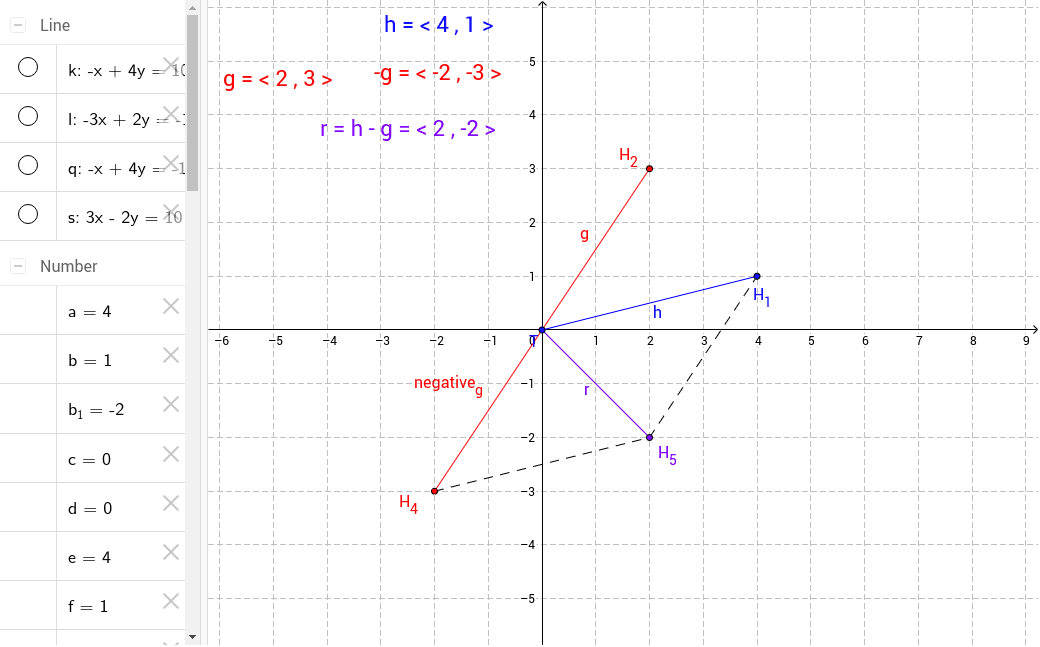
This example demonstrates the difference of vectors g and h in the XY plane by moving their heads and observing the resulting vector difference. Core math concepts include vectors, geometry, and coordinate geometry. It is constructed using commands like Segment, Line, Intersect, Mirror in GeoGebra, making it suitable for high school students learning vectors and coordinate geometry.
GeoGebra Commands & Parameters
Segment(T, H_1) → hSegment(T, H_2) → gLine(H_2, h) → kLine(H_1, g) → lIntersect(k, l) → H_3Segment(T, H_3) → r_1Segment(H_2, H_3) → mSegment(H_1, H_3) → nMirror(H_2, T) → H_4Segment(T, H_4) → negative_gLine(H_4, h) → qLine(H_1, negative_g) → sIntersect(q, s) → H_5Segment(H_4, H_5) → tSegment(H_5, H_1) → a_1Segment(T, H_5) → r
AI Drawing Prompt Reference
Draw two vectors in a 2D plane, showing their difference by moving their heads. Start by drawing line segments for the vectors, then find the intersection of the lines. Next, draw segments from the origin to the intersection point, and mirror one vector. Find the intersection of the mirrored vector with the original vector. Finally, draw segments from the head of the mirrored vector to the intersection point, and from the intersection point to the origin of the original vector, completing the difference vector display.
The prompt above was compiled from the original drawing commands and is for reference only.