
Vector and Geometric Construction: Demonstrating Vector Applications in Geometry
Loading the math board and drawing, please wait…
In collections
Book: Vectors, vectors, vectors everywhere...
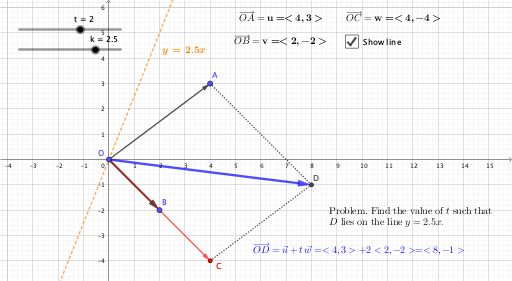
This example demonstrates the application of vectors in geometric figures, involving concepts such as vectors, statistical characteristics, isosceles triangles, solid geometry, and spheres. The construction uses GeoGebra commands like Vector, Segment, O, A, u, B, v, t, C, w, D, f, g, sum, xu, xv, xw, yw, yu, yv, xs, ys, text1, text2, text3, k, h, linetxt, text4, a, text5. Suitable for high school or university mathematics courses to understand the integration of vectors and geometry.
GeoGebra Commands & Parameters
Vector(O, A) → uVector(O, B) → vVector(O, C) → wSegment(A, D) → fSegment(D, C) → gVector(O, D) → sum
AI Drawing Prompt Reference
On the same plane, choose a common origin point O and construct three vectors pointing from O to points A, B, and C, forming a multi-direction vector layout. Then locate point D so that it connects to A and to C: draw the segment from A to D and the segment from D to C, creating two consecutive edges meeting at D. Finally, draw the vector from O to D; present it as a vector sum result relative to the earlier vectors from O (treat OD as the combined outcome of the vectors OA, OB, and OC).
The prompt above was compiled from the original drawing commands and is for reference only.