
Vector Addition Demo by user5166
Loading the math board and drawing, please wait…
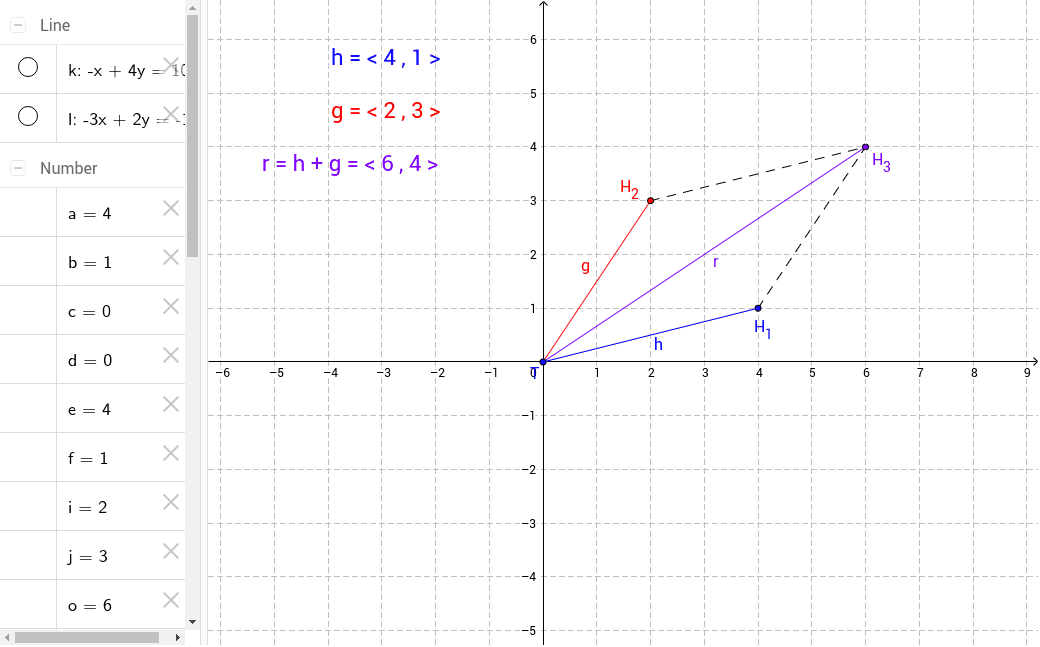
This example demonstrates the addition of two vectors g and h in the XY plane. By moving the heads of the vectors, users can visually observe the resultant vector's changes. Key math concepts include vectors, geometric representation of vectors, vector addition (parallelogram or triangle rule), and vector magnitude and direction. Construction highlights involve using GeoGebra commands/objects like Segment, Line, and Intersect to build vectors, intersection points, and auxiliary lines. Suitable for high school mathematics students learning vector operations and university-level physics courses.
GeoGebra Commands & Parameters
Segment(T, H_1) → hSegment(T, H_2) → gLine(H_2, h) → kLine(H_1, g) → lIntersect(k, l) → H_3Segment(T, H_3) → rSegment(H_2, H_3) → mSegment(H_1, H_3) → n
AI Drawing Prompt Reference
Draw two vectors in a coordinate system, showing their addition by drawing a parallelogram or triangle, with the resultant vector also represented as a line segment. Label the start and end points of the vectors to observe the changes in the resultant vector.
The prompt above was compiled from the original drawing commands and is for reference only.