
Vector Addition Demo by tuppermath
Loading the math board and drawing, please wait…
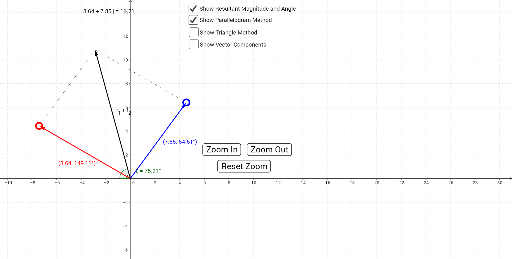
This example dynamically demonstrates vector addition, visually showing the process and result of vector composition. Core math concepts include vectors, geometric addition, parallelogram rule, vector magnitude and direction. Construction highlights from the summary involve commands/objects like Intersect, Ray, Point, Vector, Segment, Angle, Length, Translate. Suitable for high school students learning vectors, physics mechanics, or engineering drafting, and university foundational mathematics education.
GeoGebra Commands & Parameters
Intersect(xAxis, yAxis) → BRay(B, F) → sPoint(s) → JRay(B, E) → rPoint(r) → IVector(B, A) → uVector(B, C) → vVector(AA, E) → r_2Vector(CC, AA) → r_1Segment(C, F) → aSegment(A, F) → bVector(B, AX) → eVector(B, AY) → fVector(B, CX) → gVector(B, CY) → hVector(AA, GG) → kVector(GG, E) → lVector(HH, AA) → jVector(B, HH) → mAngle(G, B, I) → γAngle(I, B, H) → βAngle(H, B, I) → δAngle(I, B, G) → εLength(uv) → oTranslate(e, AA) → qAngle(J, B, H) → ζAngle(J, B, G) → αAngle(G, B, J) → θAngle(H, B, J) → ηLength(w) → ooo
AI Drawing Prompt Reference
Draw a dynamic vector addition demonstration showing the process and result of vector composition. Include two vectors, geometrically adding them using the parallelogram rule, and label their magnitudes and directions. Start by plotting the intersection of coordinate axes, then draw rays to determine the start and end points of the two vectors, followed by vectors, segments, and angles. Finally, complete the vector addition with the parallelogram rule and label the resultant vector along with its magnitude and direction.
The prompt above was compiled from the original drawing commands and is for reference only.