
Vector Addition by tuppermath
Loading the math board and drawing, please wait…
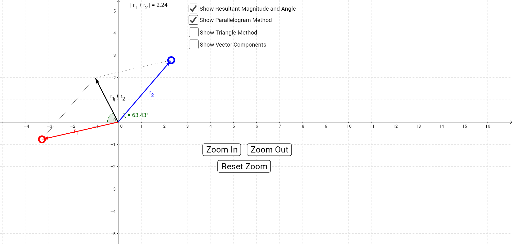
This example demonstrates the process of vector addition. Key mathematical concepts include the geometric representation and addition of vectors. Using GeoGebra commands such as Vector, Translate, and Intersect, the geometric meaning of vector addition is visually illustrated. Suitable for students at the junior high school level and above to learn the basic concepts and operations of vectors.
GeoGebra Commands & Parameters
Intersect(xAxis, yAxis) → BRay(B, F) → sPoint(s) → JRay(B, E) → rPoint(r) → IVector(B, A) → uVector(B, C) → vVector(AA, E) → r_2Vector(CC, AA) → r_1Segment(C, F) → aSegment(A, F) → bVector(B, AX) → eVector(B, AY) → fVector(B, CX) → gVector(B, CY) → hVector(AA, GG) → kVector(GG, E) → lVector(HH, AA) → jVector(B, HH) → mAngle(G, B, I) → γAngle(I, B, H) → βAngle(H, B, I) → δAngle(I, B, G) → εLength(uv) → oTranslate(e, AA) → qAngle(J, B, H) → ζAngle(J, B, G) → αAngle(G, B, J) → θAngle(H, B, J) → ηLength(w) → ooo
AI Drawing Prompt Reference
Draw a 2D coordinate system to demonstrate the geometric meaning of vector addition. Start by plotting two vectors originating from the origin, marking their start and end points. Then, translate one vector so that its start point aligns with the end point of the other vector, illustrating the parallelogram law of vector addition. Finally, label the key angles and vector lengths to clearly show the geometric process of vector addition.
The prompt above was compiled from the original drawing commands and is for reference only.