
Vector Addition and Subtraction Practice
Loading the math board and drawing, please wait…
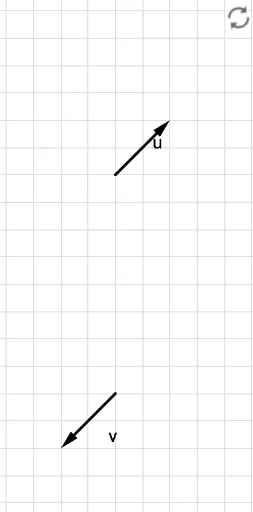
This interactive GeoGebra worksheet provides practice for adding and subtracting vectors. It displays two vectors, u and v, on the left side of the screen, and guides users through geometric constructions to perform vector addition and subtraction. The core mathematical concepts include vector representation, the parallelogram law, the triangle law, and coordinate-based operations. The construction uses GeoGebra commands such as Vector to define vectors, If and Polygon to build auxiliary shapes like parallelograms or triangles, and multiple buttons (button1 to button4) with text objects (text1 to text10) to create step-by-step exercises and instant feedback. This resource is suitable for high school or introductory college students learning vector operations, and can be used for self-study or classroom demonstration.
GeoGebra Commands & Parameters
Vector((0, -8), (e, f - 8)) → vVector((0, 0), (c, d)) → uIf(g ≟ 1, Vector[u + v], Vector[If[g ≟ 2, Vector[u - v], Vector[v - u]]]) → cwVector((0, 0), A) → wIf(A ≟ B, 1, 0) → bPolygon(C, D, F, E) → poly1, c_1, d_1, f_1, e_1
AI Drawing Prompt Reference
Draw two vectors on the left side, one from the origin to (e, f-8) and another to (c, d). Display the sum or difference of vectors u and v based on the value of parameter g, showing the sum when g is 1 and the difference otherwise. Then, draw a vector from the origin to point A. If point A coincides with point B, set parameter b to 1, otherwise set it to 0. Finally, draw a polygon using points C, D, E, and F, and display its vertices and internal information.
The prompt above was compiled from the original drawing commands and is for reference only.