
Using the Surface Area Formula for Regular Prisms
Loading the math board and drawing, please wait…
This interactive GeoGebra worksheet demonstrates how to calculate the base area, lateral area, and total surface area of regular prisms by unfolding their nets into two‑dimensional shapes and folding them back. Students explore the formulas for base area (area of the base polygon) and lateral area (perimeter of the base times height), and combine them to obtain the surface area. The construction uses the commands Polygon, Prism, Net, Segment, Vertex, and Corner to create the 3‑D prism and its planar net, while Textfield, Sequence, If and random number generators generate practice problems and verify answers. Ideal for middle school (grades 6‑8) learners to develop spatial reasoning and reinforce measurement skills.
GeoGebra Commands & Parameters
Sequence(Random[0, 99] / 100, A, 1, 200) → allRandomSeeds, {0.46, 0.45, 0.97, 0.61, 0.31, 0.11, 0.94, 0.91, 0.03, 0.28, 0.12, 0.3, 0.03, 0.5, 0.11, 0.3, 0.73, 0.41, 0.35, 0.95, 0.82, 0.48, 0.25, 0.02, 0.38, 0.44, 0.99, 0.41, 0.71, 0.29, 0.27, 0.23, 0.7, 0.29, 0.92, 0.58, 0.61, 0.63, 0.95, 0.33, 0.46, 0.11, 0.86, 0.26, 0.17, 0.36, 0.15, 0.81, 0.31, 0.15, 0.52, 0.27, 0.75, 0.85, 0.62, 0.13, 0.74, 0.52, 0.28, 0.97, 0.89, 0.64, 0.66, 0.12, 0.86, 0.26, 0.83, 0.31, 0.01, 0.83, 0.21, 0.55, 0.14, 0.9, 0.04, 0.67, 0.77, 0.31, 0.5, 0.6, 0.86, 0.87, 0.02, 0.29, 0.03, 0.73, 0.79, 0.54, 0.03, 0.16, 0.76, 0.6, 0.52, 0.48, 0.42, 0.07, 0.97, 0.43, 0.9, 0.7, 0.51, 0.08, 0.89, 0.8, 0.26, 0.98, 0.18, 0, 0.64, 0.27, 0.8, 0.36, 0.58, 0.66, 0.41, 0.72, 0.91, 0.67, 0.71, 0.21, 0.62, 0.26, 0.66, 0.85, 0.6, 0.82, 0.63, 0.89, 0.83, 0.76, 0.43, 0.98, 0.5, 0.69, 0.07, 0.42, 0.18, 0.24, 0.05, 0.06, 0.94, 0.73, 0.09, 0.89, 0.31, 0.3, 0.18, 0.28, 0.54, 0.13, 0.36, 0.42, 0.84, 0.36, 0.74, 0.76, 0.77, 0.33, 0.84, 0.81, 0.16, 0.68, 0.01, 0.68, 0.3, 0.47, 0.75, 0.23, 0.62, 0.1, 0.32, 0.12, 0.14, 0.05, 0.2, 0.5, 0.81, 0.28, 0.69, 0.93, 0.21, 0.6, 0.68, 0.36, 0.99, 0.08, 0.45, 0.53, 0.18, 0.91, 0.59, 0.33, 0.08, 0.45, 0.29, 0.73, 0.81, 0.53, 0.45, 0.47}Take(allRandomSeeds, randIndex, randIndex + numRandoms - 1) → currentRandomSeedsIf(countQuestion ≟ 0, 1, 1 + floor((currentRandomSeeds(1) * 4))) → randomNum1If(countQuestion ≟ 0, 3, Max[1 + floor(((currentRandomSeeds(2) * 3) * randomNum1)), (1 / 2 * randomNum1)]) → randomNum2Element({(2 * randomNum1^(2)) + ((4 * randomNum1) * randomNum2), (randomNum1 * triHeight) + ((3 * randomNum1) * randomNum2)}, Case) → expectedIf(Case ≟ 1, expected, (randomNum1 * exactTriHeight) + ((3 * randomNum1) * randomNum2)) → exactAnswerPolygon({(0, 0), (1, 0), (1, 1), (0, 1)}) → poly1Polygon({(0, 0), (1, 0), (cos(60°), sin(60°))}) → poly2Prism(poly2, graphHeight) → prism2, B, edge3, edgeBC, edgeCD, edgeBD, C, D, face1, face3, face2, faceBCD, edge1, edge2Prism(poly1, graphHeight) → prism1, I, edge8, edge9, edge10, edge11, edgeIJ, edgeJK, edgeKL, edgeIL, J, K, L, face8, face10, face11, face9, faceIJKLTextfield(input2) → InputBox2Polygon(Zip[PixelsToPoint[Corner[1], Corner[3], Corner[5], A], A, {(pixelsLeft, pixelsTop), (pixelsLeft, y(Corner[5]) - pixelsBottom), Corner[5] - (pixelsRight, pixelsBottom), (x(Corner[5]) - pixelsRight, pixelsTop)}]) → borderBoxCorner(5) → layoutAppSizeonboardingTextOffset(Corner[onboardingText, 1], Corner[onboardingText, 3], onboardingCase, Corner[1], Corner[3], Corner[5]) → OnboardingTextOffsetTextfield(input1) → InputBox1Textfield(input3) → InputBox3Intersect(inputOK = inputOK, inputOK = Sum[inputValid] ≟ Length[inputValid] ∧ (¬(Defined[IndexOf["?", inputStrings]] ∨ Defined[IndexOf["", inputStrings]]))) → ASequence("", A, 1, numInputBoxes) → initializeStringsSequence(false, A, 1, numInputBoxes) → initializeValidNet(prism1, fold) → net1, M, V, W, Z, A_1, B_1, face12, face13, face14, face15, face16, N, face17, edge12, edge13, edge14, edge15, edge16, edge17, edge18, edge19, edge20, O, edge21, edge22, edge23, edge24, edge25, edge26, edge27, edge28, edge29, edge30, P, Q, R, S, T, UNet(prism2, fold) → net2, E, K_1, face4, face18, face19, face20, face21, edge4, edge31, edge32, edge33, C_1, edge34, edge35, edge36, edge37, edge38, edge39, edge40, edge41, edge42, edge43, D_1, E_1, F_1, G_1, H_1, I_1, J_1Vector((0.84 + (0.16 * fold); (0.32 * (1 - fold)) + (pi / 2 * fold); ((-pi)) / 2 + ((0.8 * pi / 2) * (1 - fold)))) → viewCorner(5) → AppSizeGV1Prism(poly1, heiHint) → prismHint1, F, edge5, edge6, edge7, edge44, edgeFG, edgeGH, edge46, edge45, G, H, L_1, face5, face7, face22, face6, face23Prism(poly2, heiHint) → prismHint2, M_1, edge49, edge50, edge52, edge51, N_1, O_1, face25, face27, face26, face24, edge47, edge48Text(randomNum1, (1.35 - fold, 0.4 - (0.2 * (1 - fold)), -0.3 + fold), true, true) → labelBaseText(randomNum2, (1, ((((-graphHeight)) / 2 + 0.2) * fold) + ((1 - fold) * (-0.2)), ((graphHeight / 2 + 0.2) * (1 - fold))), true, true) → labelHeiSegment(K_1, Midpoint[E_1, F_1]) → segHeightTriText(triHeight, K_1 + (0.2, 0.5), true, true) → labelTriHeightPolygon({0.5}) → poly3Polygon({Midpoint[Midpoint[E_1, F_1], E_1], Midpoint[E_1, F_1], Translate[Midpoint[E_1, F_1], Vector[(0.25 * Vector[Midpoint[E_1, F_1], K_1] / Length[segHeightTri])]], Translate[Midpoint[E_1, Midpoint[E_1, F_1]], Vector[(0.25 * Vector[Midpoint[E_1, F_1], K_1] / Length[segHeightTri])]]}) → q1Vertex(q1, 4) → P_1
AI Drawing Prompt Reference
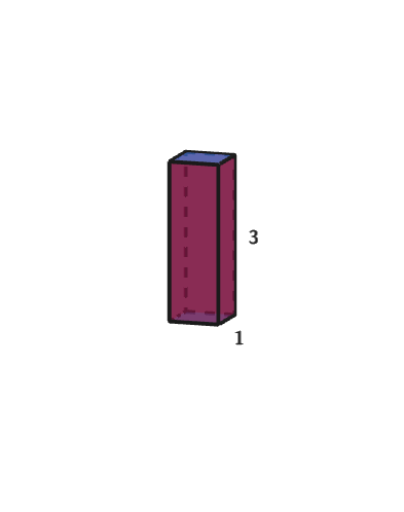
Draw an interactive unfolding of regular prisms, including a square-based rectangular prism and a triangular-based prism with equal height. When unfolded, the lateral faces and bases lie flat as a 2D net of polygons; when folded, they form 3D prisms. Label the base edge length and prism height on the net, and mark the height of the triangular base with a segment. Include two input boxes for entering base area and lateral area, and a hint box showing randomly generated parameters. The layout includes a border area for interaction.
The prompt above was compiled from the original drawing commands and is for reference only.