
Unfolding Cones
Loading the math board and drawing, please wait…
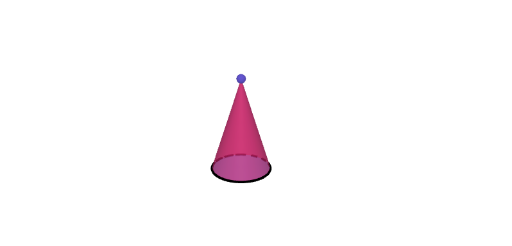
Explore the geometry of cones by unfolding and folding their nets. Change the dimensions of the cone to see how the net changes and understand its geometry. Key math concepts include surface area and volume of cones. Constructed using GeoGebra commands like Point, Circle, Ray, Sequence, Polygon, OrthogonalLine, Segment, Net, Cone. Suitable for grades 6-8 students learning to identify nets of prisms, pyramids, cylinders, and cones.
GeoGebra Commands & Parameters
Point(yAxis) → CAPoint(yAxis) → CBCircle(CA, CB) → cCilPoint(cCil) → CRay(A, (x(A), y(A), 40)) → hPoint(yAxis) → BSequence(Rotate[C, ((t * 2) * pi / n), A], t, 1, n) → vertPolygon(vert) → polyOrthogonalLine(C, xOyPlane) → fSegment(HC, (x(C), y(C), 4)) → gPoint(g) → EPrism(poly, Segment[C, E]) → a, F, face3, face4, face5, face6, face2, face13, face15, faceFGHIJK, edge1, edge2, G, edge3, edge4, edge5, edge6, edge13, edge16, edgeFG, edgeGH, edgeHI, edgeIJ, H, edgeJK, edgeFK, edge14, edge17, I, J, K, L, M, face1Point(Segment[(0, 0, 0.1), (0, 0, 4)]) → CDPyramid(poly, CD) → b, face7, edge8, edge9, edge10, edge11, edge12, edge15, edge18, face9, face10, face11, face12, face8, face14, face16, edge7Net(a, (-open)) → prismNet, N, W, Z, A_1, B_1, C_1, D_1, E_1, F_1, G_1, H_1, O, I_1, J_1, K_1, L_1, M_1, N_1, O_1, P_1, Q_1, R_1, P, S_1, face17, face18, face19, face20, face21, face22, face23, face24, face34, Q, face35, edge19, edge20, edge21, edge22, edge23, edge24, edge25, edge26, edge27, R, edge28, edge29, edge30, edge31, edge32, edge33, edge34, edge35, edge36, edge37, S, edge38, edge39, edge40, edge41, edge42, edge43, edge44, edge45, edge70, edge71, T, edge72, edge73, edge74, edge75, edge76, edge77, edge78, edge79, edge80, edge81, U, VNet(b, (-open)) → pyrNet, T_1, E_2, F_2, G_2, H_2, I_2, J_2, K_2, face25, face26, face27, U_1, face28, face29, face30, face31, face32, face33, edge46, edge47, edge48, edge49, V_1, edge50, edge51, edge52, edge53, edge54, edge55, edge56, edge57, edge58, edge59, W_1, edge60, edge61, edge62, edge63, edge64, edge65, edge66, edge67, edge68, edge69, Z_1, A_2, B_2, C_2, D_2Random(3, 8) → nRandCircle(CA, CB) → dCylinder(cCil, 3) → bCil, eCil, fCilLine(CC, xAxis) → aCilOrthogonalLine(CD, xOyPlane) → gCilCircle(gCil, CC) → kCilRotate(Rotate[eCil, ϕCil, aCil], ϕCil, xAxis) → eeCilRotate(Rotate[eCil, ϕCil, aCil], ϕCil, xAxis) → dCilCircle(CA, CB) → hCilIf(abs(tCil) < 1, ((rCil * sin((-θCil))), ((rCil * (1 - cos((-θCil)))) * cos(ϕCil)) - (3 * sin(ϕCil)), (3 * cos(ϕCil)) + ((rCil * (1 - cos((-θCil)))) * sin(ϕCil))), ((-pi), (-3 * sin(ϕCil)), (3 * cos(ϕCil)))) → CEIf(abs(tCil) < 1, ((rCil * sin(θCil)), ((rCil * (1 - cos(θCil))) * cos(ϕCil)) - (3 * sin(ϕCil)), (3 * cos(ϕCil)) + ((rCil * (1 - cos(θCil))) * sin(ϕCil))), (pi, (-3 * sin(ϕCil)), (3 * cos(ϕCil)))) → CFIf(abs(tCil) < 1, ((rCil * sin((-θCil))), ((rCil * (1 - cos((-θCil)))) * cos(ϕCil)), ((rCil * (1 - cos((-θCil)))) * sin(ϕCil))), ((-pi), 0, 0)) → CGIf(abs(tCil) < 1, ((rCil * sin(θCil)), ((rCil * (1 - cos(θCil))) * cos(ϕCil)), ((rCil * (1 - cos(θCil))) * sin(ϕCil))), (pi, 0, 0)) → CHSegment(CE, CG) → mCilSegment(CF, CH) → nCilLine((0, 1, 0), zAxis) → pCilCircle(pCil, CB) → qCilCircle(pCil, CB) → sCilSegment((1, 0, 0), (1, 0, 5)) → aConCircle(aCon, (0, 0, 0)) → cConPoint(aCon) → KAIntersect(xAxis, aCon) → KBCone(KB, KA, 1) → bCon, dCon, eConIntersect(yAxis, xAxis) → KCSegment(KC, KA) → lConDistance(KB, KC) → rConAngle(KA, KC, KB) → αRotate(KA, (abs(tCil) * α), yAxis) → KAAOrthogonalLine(KAA, xOyPlane) → fConIntersect(fCon, xOyPlane) → KBBRotate(KC, bet / 2, fCon) → KCCRotate(KC, ((-bet)) / 2, fCon) → KCRCircumcircleArc(KCC, KC, KCR) → gConDistance(KAA, KBB) → hConDistance(KBB, KCC) → rcConSurface(((kCon - ((v * rcCon) * cos((u * bet / 2)))) * cos(ϕCon)) - (((1 - v) * hCon) * sin(ϕCon)), ((v * rcCon) * sin((u * bet / 2))), (((1 - v) * hCon) * cos(ϕCon)) + ((kCon - ((v * rcCon) * cos((u * bet / 2)))) * sin(ϕCon)), u, -1, 1, v, 0, 1) → jConCurveCartesian(((kCon - (rcCon * cos((u * bet / 2)))) * cos(ϕCon)), (rcCon * sin((u * bet / 2))), ((kCon - (rcCon * cos((u * bet / 2)))) * sin(ϕCon)), u, -1, 1) → mConSegment(KE, KF) → nConSegment(KD, KF) → pConIf(abs(tCil) < 1, CurveCartesian[(rCil * sin((u * θCil))), ((rCil * (1 - cos((u * θCil)))) * cos(ϕCil)) - (3 * sin(ϕCil)), (3 * cos(ϕCil)) + ((rCil * (1 - cos((u * θCil)))) * sin(ϕCil)), u, -1, 1], CurveCartesian[(pi * u), (-3 * sin(ϕCil)), (3 * cos(ϕCil)), u, -1, 1]) → jCilIf(abs(tCil) < 1, CurveCartesian[(rCil * sin((u * θCil))), ((rCil * (1 - cos((u * θCil)))) * cos(ϕCil)), ((rCil * (1 - cos((u * θCil)))) * sin(ϕCil)), u, -1, 1], CurveCartesian[(pi * u), 0, 0, u, -1, 1]) → lCilIf(abs(tCil) < 1, Surface[(rCil * sin((u * θCil))), ((rCil * (1 - cos((u * θCil)))) * cos(ϕCil)) - (v * sin(ϕCil)), (v * cos(ϕCil)) + ((rCil * (1 - cos((u * θCil)))) * sin(ϕCil)), u, -1, 1, v, 0, 3], Surface[(pi * u), ((-v) * sin(ϕCil)), (v * cos(ϕCil)), u, -1, 1, v, 0, 3]) → iCil
AI Drawing Prompt Reference
Create a 3D cone together with its unfolded net. First define the cone’s base circle in space using a base center and two points on the circle, then determine the cone by connecting the apex to the base circle and setting its height/radius using the chosen construction parameters. Next, split the circular rim into n equal positions and use the corresponding generatrix segments from the apex to unfold the cone’s lateral surface into a flat pattern composed of several connected sector-like polygon faces. Show the essential relations: the base circle, the apex, the generatrix connections that match the unfolded seams, and the resulting net lying in a plane so the folding correspondence is visually clear.
The prompt above was compiled from the original drawing commands and is for reference only.