
Two Unit Circle Demo
Loading the math board and drawing, please wait…
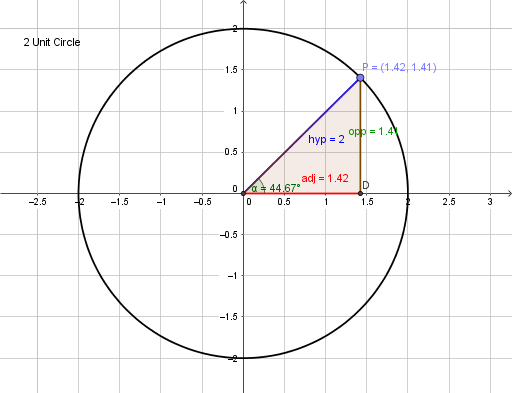
This example demonstrates the geometric properties and reflection symmetry of unit circles. It involves core math concepts like unit circle, reflection, centroid, difference, and slope. Construction highlights include using commands such as Intersect, Circle, Point, Segment, OrthogonalLine, Polygon, and Angle. Suitable for high school mathematics teaching, aiding in understanding analytical geometry and geometric transformations.
GeoGebra Commands & Parameters
Intersect(xAxis, yAxis) → ACircle(A, B) → cPoint(c) → PSegment(A, P) → hypOrthogonalLine(P, xAxis) → fIntersect(f, xAxis) → DSegment(P, D) → oppSegment(D, A) → adjPolygon(A, D, P) → poly1, p, a, dAngle(B, A, P) → α
AI Drawing Prompt Reference
Draw a unit circle with its center intersecting the x-axis at point A. Draw a perpendicular from the center to the x-axis, meeting it at D. Connect the center to D and draw another perpendicular from D to the x-axis, meeting it at P. Form a right triangle with vertices A, D, and P. Label the hypotenuse and adjacent side. Connect the center to P and label the sides accordingly.
The prompt above was compiled from the original drawing commands and is for reference only.