
Ellipse and Hyperbola Geometric Construction (1)
Loading the math board and drawing, please wait…
In collections
geometriadinamica.es
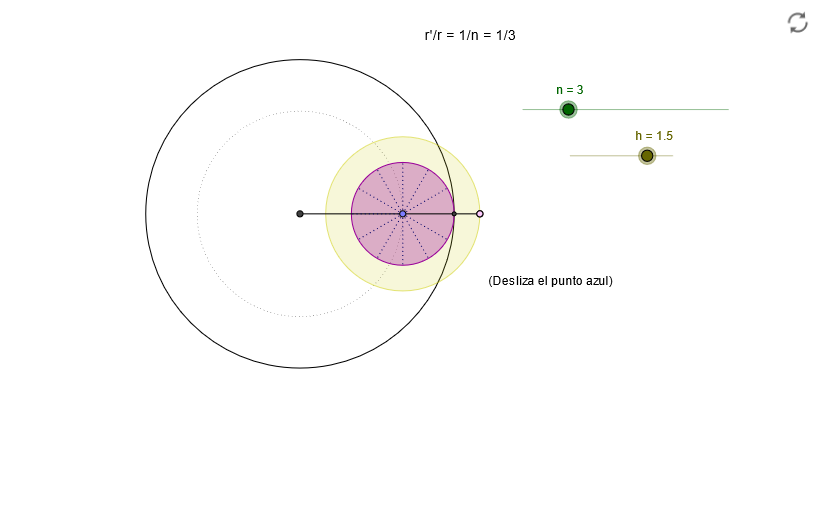
This example demonstrates the geometric construction of ellipses and hyperbolas by tracing the locus of intersection points between a rotating circle and a line. Key mathematical concepts include circles, rotation, intersection points, trigonometry (sine), arithmetic mean inequality, and isosceles triangle properties. The construction utilizes GeoGebra commands such as Intersect, Circle, Point, Angle, Ray, Rotate, CircleArc, and Segment. It is suitable for high school mathematics students to understand the generation principles of conic sections and the methods of geometric construction, as well as for teaching the integration of analytical geometry and trigonometric functions.
GeoGebra Commands & Parameters
Intersect(xAxis, yAxis) → OCircle(O, B) → cCircle(O, 1 - m / n) → dPoint(d) → ACircle(A, h / n) → rAngle(B, O, A) → αRay(O, A) → bIntersect(c, b) → D,Ray(A, D) → b_1Intersect(r, b_1, 1) → ERotate(E, ((-n) * α), A) → FCircle(A, m / n) → eRotate(D, ((-n) * α / m), A) → CCircleArc(A, C, D) → fCircleArc(O, B, D) → gSegment(O, A) → h_1Rotate(A, 29.999999999999996°, A) → A'Rotate(C, 29.999999999999996°, A) → C'Segment(A', C') → iRotate(A', 29.999999999999996°, A) → A''Rotate(C', 29.999999999999996°, A) → C''Segment(A'', C'') → jRotate(A'', 29.999999999999996°, A) → A'''Rotate(C'', 29.999999999999996°, A) → C'''Segment(A''', C''') → kRotate(A''', 29.999999999999996°, A) → A''''Rotate(C''', 29.999999999999996°, A) → C''''Segment(A'''', C'''') → lRotate(A'''', 29.999999999999996°, A) → A'''''Rotate(C'''', 29.999999999999996°, A) → C'''''Segment(A''''', C''''') → m_1Rotate(A''''', 29.999999999999996°, A) → A''''''Rotate(C''''', 29.999999999999996°, A) → C''''''Segment(A'''''', C'''''') → n_1Rotate(A'''''', 29.999999999999996°, A) → A'''''''Rotate(C'''''', 29.999999999999996°, A) → C'''''''Segment(A''''''', C''''''') → pRotate(A''''''', 29.999999999999996°, A) → A''''''''Rotate(C''''''', 29.999999999999996°, A) → C''''''''Segment(A'''''''', C'''''''') → qRotate(A'''''''', 29.999999999999996°, A) → A'''''''''Rotate(C'''''''', 29.999999999999996°, A) → C'''''''''Segment(A''''''''', C''''''''') → sRotate(A''''''''', 29.999999999999996°, A) → A''''''''''Rotate(C''''''''', 29.999999999999996°, A) → C''''''''''Segment(A'''''''''', C'''''''''') → tRotate(A'''''''''', 29.999999999999996°, A) → A'''''''''''Rotate(C'''''''''', 29.999999999999996°, A) → C'''''''''''Segment(A''''''''''', C''''''''''') → a_1Segment(A, F) → aRotate(E, ((-n) * α), A) → G
AI Drawing Prompt Reference
Draw an ellipse and a hyperbola. Start by drawing a circle c with the origin as its center, then draw another circle d with the origin as its center and radius 1-m/n. On circle d, pick a point A, and draw a circle r with A as its center and radius h/n. Draw a ray b from A through B, and let it intersect circle c at point D. Draw a circle arc f from A through D, and let it intersect circle c at point C. Then, draw a circle e with A as its center and radius m/n, and draw a circle arc g from A through C. Next, rotate ray b around A and draw a circle arc h from the intersection of the rotated ray with circle r through the rotated point C. Repeat the rotation and circle arc drawing process until the entire figure is completed.
The prompt above was compiled from the original drawing commands and is for reference only.