
Deriving Circle Area from Known Concepts
Loading the math board and drawing, please wait…
In collections
Visual Geometry for Grade 9
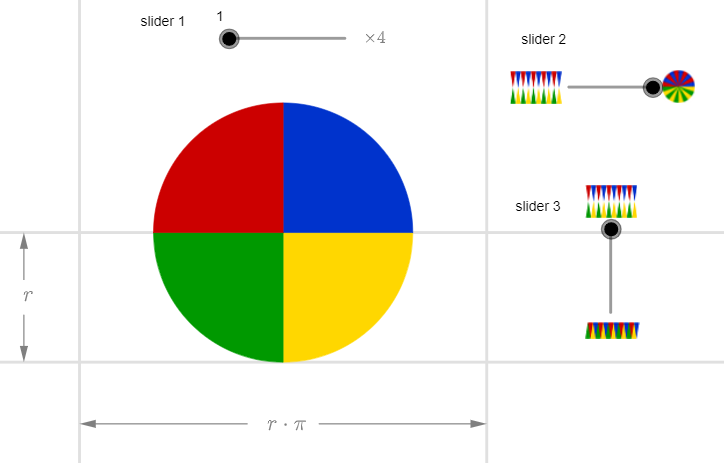
This example demonstrates how to derive the area formula of a circle by dissecting and rearranging shapes. Key math concepts include circle, area, coordinate geometry, and central symmetry transformations. Construction highlights involve commands like Sequence, Point, OrthogonalLine, Mirror, Intersect, and Vector. Suitable for high school mathematics teaching or self-learning to understand the geometric origin of the circle's area formula.
GeoGebra Commands & Parameters
Sequence((((2 * i) - 1) * a), i, 1, n) → angles, {0.7853981633974483}Sequence(Vector[(d * Vector[(cos((-Element[angles, i])), sin((-Element[angles, i])))])], i, 1, n) → vectors, {(1.0000000000000002, -1)}Sequence(Midpoint[Cell[2, i], Cell[2, 1 + i]], i, 1, n) → midpoints, {(0.5000000000000001, 0.5)}Sequence(Intersect[Circle[Cell[2, i], 1], OrthogonalLine[Element[midpoints, i], Line[Cell[2, i], Cell[2, 1 + i]]]], i, 1, n) → lowpoints, {(2.2204460492503128E-16, 2.4651903288156613E-32)}Sequence(Mirror[Element[lowpoints, i], yAxis], i, 1, n) → lowpoints2, {(-2.2204460492503128E-16, 5.184452475709442E-32)}Sequence(Midpoint[Cell[3, i], Cell[3, 1 + i]], i, 1, n) → midpointsDown, {(-0.5000000000000001, -0.5)}Sequence(Intersect[Circle[Cell[3, i], 1], OrthogonalLine[Element[midpointsDown, i], Line[Cell[3, i], Cell[3, 1 + i]]]], i, 1, n) → uppoints, {(-2.2204460492503128E-16, -2.4651903288156613E-32)}Sequence(Mirror[Element[uppoints, i], yAxis], i, 1, n) → uppoints2, {(2.2204460492503128E-16, -5.184452475709442E-32)}Point(yAxis) → BOrthogonalLine(B, yAxis) → gPoint(g) → CMirror(C, yAxis) → C'Point(h) → DMirror(D, (-2, -0.5)) → D'Intersect(b, xAxis) → EIntersect(c, h) → FIntersect(e, g) → GIntersect(g, f) → HVector(D', I) → uVector(D, F) → vVector(C', G) → wVector(C, H) → zSequence(CircleSector[Element[uppoints, i], Cell[3, 1 + i], Cell[3, i]], i, 1, n, 2) → sectorsDown1, {0.7853981633974483}Sequence(CircleSector[Element[uppoints2, i], Mirror[Cell[3, i], yAxis], Mirror[Cell[3, 1 + i], yAxis]], i, 1, n, 2) → sectorsDown3, {0.7853981633974483}Sequence(CircleSector[Element[lowpoints, i], Cell[2, 1 + i], Cell[2, i]], i, 1, n, 2) → sectors1, {0.7853981633974485}Sequence(CircleSector[Element[lowpoints2, i] + ((2 * x(A)), 0), Mirror[Cell[2, i], yAxis] + ((2 * x(A)), 0), Mirror[Cell[2, 1 + i], yAxis] + ((2 * x(A)), 0)], i, 1, n, 2) → sectors3, {0.7853981633974484}Sequence(CircleSector[Element[lowpoints, i], Cell[2, 1 + i], Cell[2, i]], i, 2, n, 2) → sectors2, {}Sequence(CircleSector[Element[lowpoints2, i] + ((2 * x(A)), 0), Mirror[Cell[2, i], yAxis] + ((2 * x(A)), 0), Mirror[Cell[2, 1 + i], yAxis] + ((2 * x(A)), 0)], i, 2, n, 2) → sectors4, {}Sequence(CircleSector[Element[uppoints, i], Cell[3, 1 + i], Cell[3, i]], i, 2, n, 2) → sectorsDown2, {}Sequence(CircleSector[Element[uppoints2, i], Mirror[Cell[3, i], yAxis], Mirror[Cell[3, 1 + i], yAxis]], i, 2, n, 2) → sectorsDown4, {}
AI Drawing Prompt Reference
Draw a circle and derive its area formula by dissecting and rearranging shapes. Start by creating a sequence of angles, then generate vectors based on these angles. Find the midpoints and intersection points to create more points and arcs. Use symmetry transformations to generate additional points and arcs. Finally, connect these arcs to form an approximate rectangle, visually demonstrating the derivation of the circle's area.
The prompt above was compiled from the original drawing commands and is for reference only.