
Coordinates of Special Angle Values on a Unit Circle
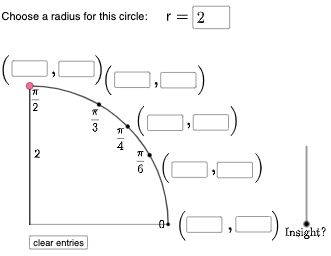
Loading the math board and drawing, please wait…
This example demonstrates the coordinate relationships of special angles (0°, 30°, 45°, 60°, 90°, etc.) on a unit circle, involving core concepts like the unit circle, trigonometric functions (sine, cosine), and coordinate geometry. It uses GeoGebra commands such as Circle, Intersect, Rotate, Mirror, Polygon, Segment, Angle, Midpoint, and Vector. Suitable for high school students to understand the geometric meaning of trigonometric functions and for introductory calculus education.
GeoGebra Commands & Parameters
Circle((0, 0), L) → cIntersect(xAxis, yAxis) → AIntersect(c, xAxis, 2) → BRotate(L, π / 6, A) → CRotate(L, π / 4, A) → DRotate(L, π / 3, A) → EMirror(C, yAxis) → C'Mirror(D, yAxis) → D'Mirror(E, yAxis) → E'Mirror(E', xAxis) → E''Mirror(D', xAxis) → D''Mirror(C', xAxis) → C''Mirror(C, xAxis) → C'_{1}Mirror(D, xAxis) → D'_{1}Mirror(E, xAxis) → E'_{1}Intersect(c, xAxis, 1) → GIntersect(c, yAxis, 1) → HIf(a ≟ 1, B, a ≟ 6, E', a ≟ 7, D', a ≟ 8, C', a ≟ 9, G, a ≟ 10, C'', a ≟ 2, a ≟ 11, D'', a ≟ 12, E'', a ≟ 13, H, a ≟ 14, E'_{1}, a ≟ 15, D'_{1}, C, a ≟ 16, C'_{1}, a ≟ 3, D, a ≟ 4, E, a ≟ 5, F) → PIntersect(eq1, xAxis) → IPolygon(A, I, P) → t1, p, a_1, iSegment(A, P) → fAngle(P, I, A) → αMidpoint(A, P) → JSegment(A, P) → jSegment(A, I) → kSegment(I, P) → lAngle(I, A, P) → βVector(A, I) → uSurdText(x(I)) → text3SurdText(y(P)) → text4Vector(I, P) → vAngle(B, A, P) → γTextfield(q) → InputBox1Textfield(r) → InputBox2Textfield(b) → InputBox3Textfield(d) → InputBox4Textfield(e) → InputBox5Textfield(g) → InputBox6Textfield(h) → InputBox7Textfield(m) → InputBox8Textfield(n) → InputBox9Textfield(o) → InputBox10Textfield(s) → InputBox11Intersect(j, xAxis) → KPoint(yAxis) → MCircleArc((0, 0), (2, 0), (0, 2)) → tIf(c1, "√", "x") → text1If(c2, "√", "x") → text2If(c3, "√", "x") → text5If(c4, "√", "x") → text6If(c5, "√", "x") → text7Point(t) → NSegment((0, 0), N) → f_1Segment((0, 0), (2, 0)) → g_1Segment((0, 0), (0, 2)) → h_1
AI Drawing Prompt Reference
Draw a coordinate plane with the x-axis and y-axis, then construct a circle centered at the origin with radius L (unit-circle style). Mark the intersection of the axes to serve as a reference point, and place points on the circle where it meets the x-axis. Using the same center, generate points by rotating a radius position by π/6, π/4, and π/3 to obtain corresponding special-angle points in the first quadrant. Mirror these points across the y-axis to get their symmetric images, then mirror across the x-axis to obtain the remaining symmetric points. Connect the origin to the key endpoints to form a polygon and several segments, and include angle markings at the formed angle locations. Add coordinate-based square-root text labels near the relevant points.
The prompt above was compiled from the original drawing commands and is for reference only.