
Two Symmetric Circles Nested Inside Each Other
Loading the math board and drawing, please wait…
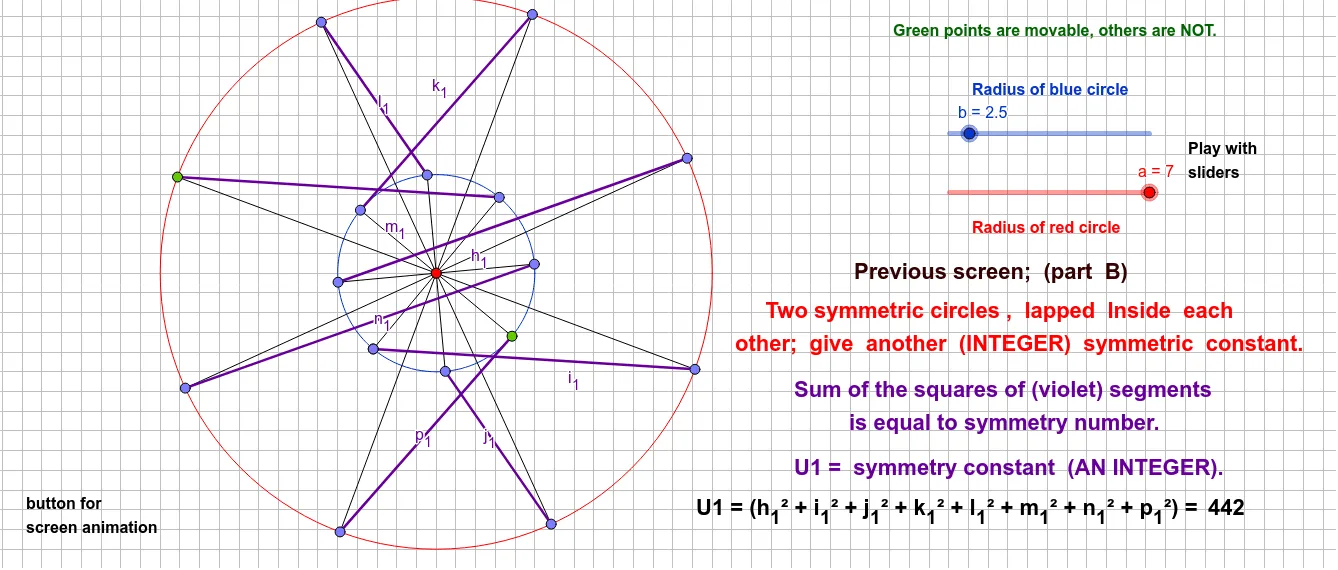
① This example demonstrates two circles that are symmetric with respect to an axis or center, nested inside each other (one circle lies within the other), showing symmetry and positional relationships through rotation and angle transformations. ② Core mathematical concepts include circle symmetry, rotational symmetry, geometric transformations (rotation), and the relationship between circles and polygons (such as quadrilaterals), involving circumcircles, incircles, similar triangles, and trigonometry. ③ Construction highlights: From the construction summary, the GeoGebra commands used are Circle, Point, Rotate, Segment, and Angle. Multiple points (e.g., B, G, I, C, D, A, F, H) and their rotated copies (with primes) are created, along with several angles (α, β, γ, etc.) and segments, using rotation and angle control to achieve the symmetric nested structure. ④ Suitable for middle school to high school levels, this example is ideal for geometry teaching, helping students understand circle symmetry, rotational geometry, and geometric transformations in dynamic graphics, as well as exploring relationships between circles and polygons.
GeoGebra Commands & Parameters
Circle(B, b) → dPoint(d) → GRotate(G, 45°, B) → G'Rotate(G', 45°, B) → G''Rotate(G'', 45°, B) → G'''Rotate(G''', 45°, B) → IRotate(I, 45°, B) → I'Rotate(I', 45°, B) → I''Rotate(I'', 45°, B) → I'''Circle(A, a) → cPoint(c) → FRotate(F, 45°, A) → F'Rotate(F', 45°, A) → F''Rotate(F'', 45°, A) → F'''Rotate(F''', 45°, A) → HRotate(H, 45°, A) → H'Rotate(H', 45°, A) → H''Rotate(H'', 45°, A) → H'''Segment(A, F) → gAngle(F, A, F') → αSegment(A, F') → iAngle(F', A, F'') → βSegment(A, F'') → jAngle(F'', A, F''') → γSegment(A, F''') → kAngle(F''', A, H) → δSegment(A, H) → lAngle(H, A, H') → εSegment(A, H') → mAngle(H', A, H'') → ζSegment(A, H'') → nAngle(H'', A, H''') → ηSegment(A, H''') → pSegment(B, G) → hAngle(G, B, G') → θSegment(B, G') → qAngle(G', B, G'') → ιSegment(B, G'') → rAngle(G'', B, G''') → κSegment(B, G''') → sAngle(G''', B, I) → λSegment(B, I) → tAngle(I, B, I') → μSegment(B, I') → eAngle(I', B, I'') → νSegment(B, I'') → f_1Rotate(I', 45°, B) → I''_1Angle(I', B, I''_1) → ξAngle(I'', B, I''') → οSegment(B, I''') → g_1Segment(I', H') → h_1Segment(I'', H) → i_1Segment(I''', F''') → j_1Segment(H'', I) → k_1Segment(H''', G''') → l_1Segment(F, G'') → m_1Segment(F', G') → n_1Segment(G, F'') → p_1
AI Drawing Prompt Reference
Draw two concentric circles, with one circle inside the other. Start by drawing a circle d centered at point B, then take point G on circle d and rotate it 45 degrees around point B to get G', and continue rotating to get G'', G'''. Next, draw a circle c centered at point A, take point F on circle c and rotate it 45 degrees around point A to get F', and continue rotating to get F'', F'''. The two circles are symmetric through rotation, forming a nested structure, and draw multiple angles and segments to demonstrate rotational symmetry and angle relationships.
The prompt above was compiled from the original drawing commands and is for reference only.