
Two Methods of Enlargement
Loading the math board and drawing, please wait…
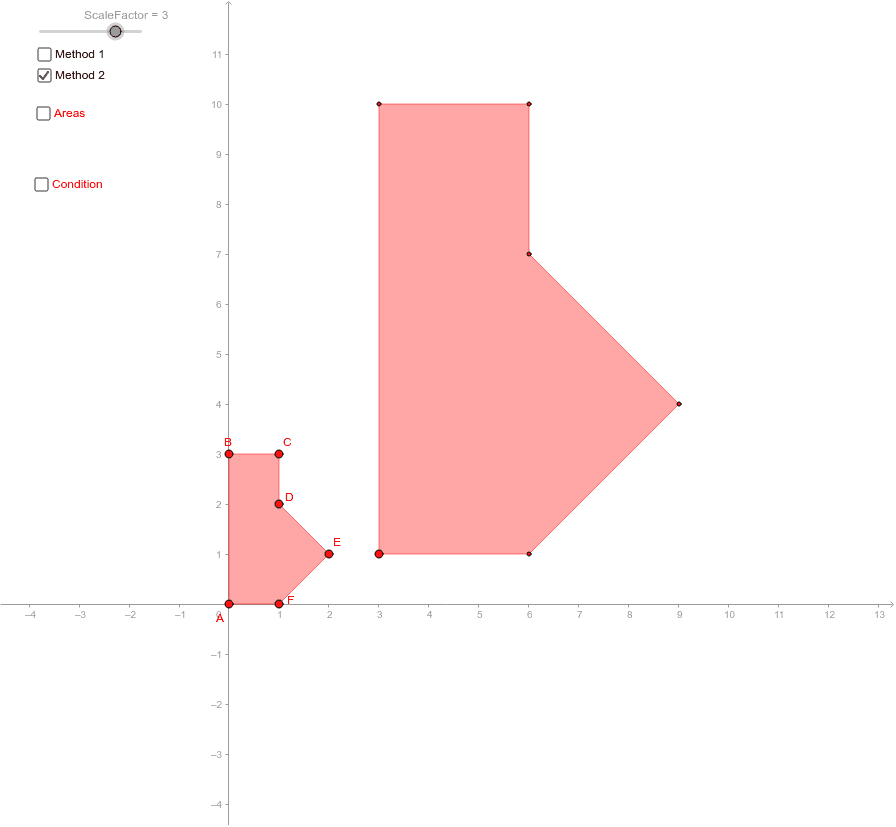
This example demonstrates two methods of enlargement. It involves angles, quadrilaterals, and isosceles triangles. Using GeoGebra commands such as Polygon, Dilate, Ray, Vector, and Translate, the enlargement effect is constructed. Suitable for students at the junior high school level and above to learn about the concept of enlargement.
GeoGebra Commands & Parameters
Polygon(A, B, C, D, E, F) → poly1, a, b, c, d, e, fDilate(A, ScaleFactor, O) → A'Dilate(B, ScaleFactor, O) → B'Dilate(C, ScaleFactor, O) → C'Dilate(D, ScaleFactor, O) → D'Dilate(E, ScaleFactor, O) → E'Dilate(F, ScaleFactor, O) → F'Polygon(A', B', C', D', E', F') → poly1', a', b', c', d', e', f'Ray(O, B) → gRay(O, A) → hVector(A, B) → uVector(B, C) → vVector(C, D) → wVector(D, E) → zVector(E, F) → jVector(F, A) → lTranslate(H, Vector[(ScaleFactor * u)]) → H'Translate(H', Vector[(ScaleFactor * v)]) → H''Vector(H', H'') → nTranslate(H'', Vector[(ScaleFactor * w)]) → H'''Vector(H'', H''') → pTranslate(H''', Vector[(ScaleFactor * z)]) → GVector(H''', G) → qTranslate(G, Vector[(ScaleFactor * j)]) → G'Vector(G, G') → rTranslate(G', Vector[(ScaleFactor * l)]) → G''Vector(G', G'') → sVector(H, H') → mPolygon(H, H', H'', H''', G, G') → poly2, h_1, h', h'', h''', g_1, g'
AI Drawing Prompt Reference
Draw a hexagon ABCDEF, then enlarge it centered at point O with a scaling factor to create a new hexagon A'B'C'D'E'F'. Next, draw rays from O to B and A, and generate vectors u, v, w, z, j, and l. Use these vectors to translate point H to H', H'', H''', G, G', and G''. Connect these points to form a new hexagon.
The prompt above was compiled from the original drawing commands and is for reference only.