
Two Fraction Bars
Loading the math board and drawing, please wait…
In collections
P3 3N5 分數圖示 / Fraction representations
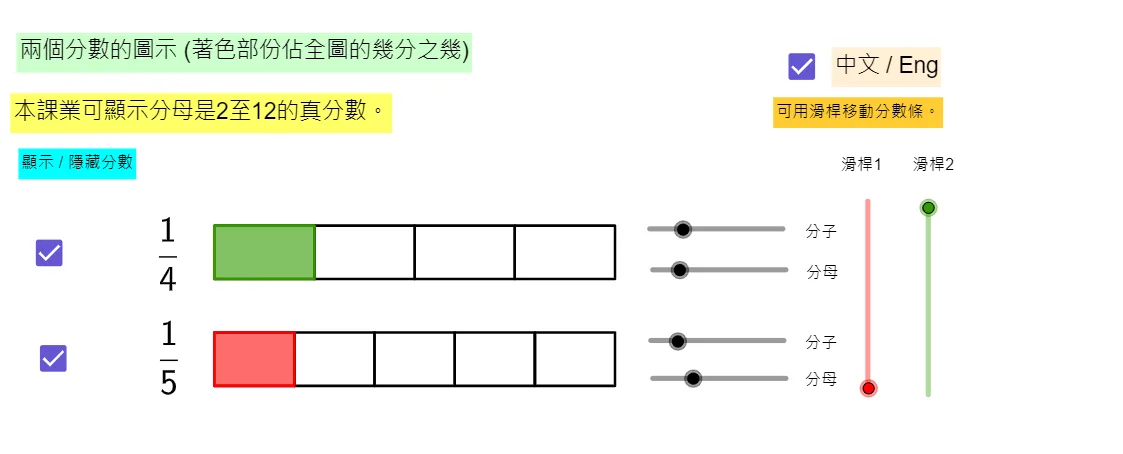
This example demonstrates two fraction bars. By adjusting the numerator and denominator values, one can observe the relationship between fractions. Key mathematical concepts include fractions, ratios, and geometric construction. It uses GeoGebra commands such as Sequence and If for construction. Suitable for high-grade elementary or junior high school students to learn about fractions.
GeoGebra Commands & Parameters
Sequence(Polygon[(Cx + (len1 * (k - 1)), Cy + Move1), (Cx + (len1 * (k - 1)), Cy + Wid + Move1), (Cx + (len1 * k), Cy + Wid + Move1), (Cx + (len1 * k), Cy + Move1)], k, 1, D1) → RecD1Sequence(Polygon[(Cx + (len1 * (k - 1)), Cy + Move1), (Cx + (len1 * (k - 1)), Cy + Wid + Move1), (Cx + (len1 * k), Cy + Wid + Move1), (Cx + (len1 * k), Cy + Move1)], k, 1, N1) → RecN1If(ShowChi, "滑桿2", "Slider 2") → Move2TextSequence(Polygon[(Cx + (len2 * (k - 1)), Cy + Sp + Move2), (Cx + (len2 * (k - 1)), Cy + Wid + Sp + Move2), (Cx + (len2 * k), Cy + Wid + Sp + Move2), (Cx + (len2 * k), Cy + Sp + Move2)], k, 1, D2) → RecD2Sequence(Polygon[(Cx + (len2 * (k - 1)), Cy + Sp + Move2), (Cx + (len2 * (k - 1)), Cy + Wid + Sp + Move2), (Cx + (len2 * k), Cy + Wid + Sp + Move2), (Cx + (len2 * k), Cy + Sp + Move2)], k, 1, N2) → RecN2Sequence(Polygon[(Cx + (len3 * (k - 1)), Cy + (2 * Sp) + Move3), (Cx + (len3 * (k - 1)), Cy + Wid + (2 * Sp) + Move3), (Cx + (len3 * k), Cy + Wid + (2 * Sp) + Move3), (Cx + (len3 * k), Cy + (2 * Sp) + Move3)], k, 1, D3) → RecD3Sequence(Polygon[(Cx + (len3 * (k - 1)), Cy + (2 * Sp) + Move3), (Cx + (len3 * (k - 1)), Cy + Wid + (2 * Sp) + Move3), (Cx + (len3 * k), Cy + Wid + (2 * Sp) + Move3), (Cx + (len3 * k), Cy + (2 * Sp) + Move3)], k, 1, N3) → RecN3Sequence(Polygon[(Cx + (len4 * (k - 1)), Cy + (3 * Sp) + Move4), (Cx + (len4 * (k - 1)), Cy + Wid + (3 * Sp) + Move4), (Cx + (len4 * k), Cy + Wid + (3 * Sp) + Move4), (Cx + (len4 * k), Cy + (3 * Sp) + Move4)], k, 1, D4) → RecD4Sequence(Polygon[(Cx + (len4 * (k - 1)), Cy + (3 * Sp) + Move4), (Cx + (len4 * (k - 1)), Cy + Wid + (3 * Sp) + Move4), (Cx + (len4 * k), Cy + Wid + (3 * Sp) + Move4), (Cx + (len4 * k), Cy + (3 * Sp) + Move4)], k, 1, N4) → RecN4If(ShowChi, "本課業可顯示分母是2至12的真分數。", "This applet can represent fractions with denominators ranging from 2 to 12.") → Note1If(ShowChi, "可用滑桿移動分數條。", "Move the fraction bars by using the sliders.") → Note2If(ShowChi, "滑桿1", "Slider 1") → Move1TextIf(ShowChi, "滑桿3", "Slider 3") → Move3TextIf(ShowChi, "滑桿4", "Slider 4") → Move4TextIf(ShowChi, "分子", "N") → TextN4If(ShowChi, "分母", "D") → TextD4If(ShowChi, "分子", "N") → TextN3If(ShowChi, "分母", "D") → TextD3If(ShowChi, "分子", "N") → TextN2If(ShowChi, "分母", "D") → TextD2If(ShowChi, "分子", "N") → TextN1If(ShowChi, "分母", "D") → TextD1If(ShowChi, "顯示 / 隱藏分數", "Show / Hide Fractions") → TextShowFracIf(ShowChi, "兩個分數的圖示 (著色部份佔全圖的幾分之幾)", "Drawings of two fractions (Coloured part(s) of the whole figure)") → Title
AI Drawing Prompt Reference
Draw two fraction bars composed of multiple rectangles, where the number of rectangles is controlled by sliders. Each rectangle represents a part of the fraction, and adjusting the sliders changes the numerator and denominator, demonstrating the relationship between fractions. The bars are separated by intervals, creating a geometric construction appearance.
The prompt above was compiled from the original drawing commands and is for reference only.