
Two-Colored Vase
Loading the math board and drawing, please wait…
In collections
Function Arts
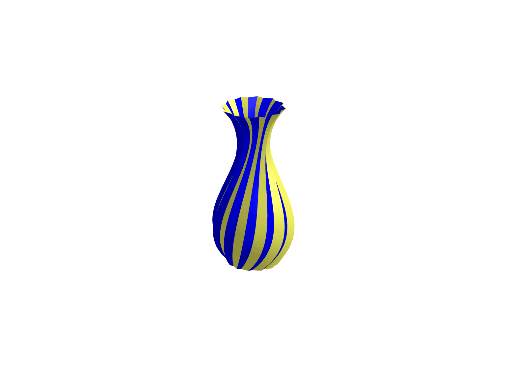
This example demonstrates how to use GeoGebra to draw a two-colored vase. It involves the concepts of functions and surfaces. By using commands such as Rotate, Sequence, and Surface, a vase with different colors can be constructed. Suitable for high school mathematics education and learning.
GeoGebra Commands & Parameters
Rotate(g, 80°, yAxis) → g_{1}Rotate(h, 80°, yAxis) → bRotate(g_{1}, 15°, zAxis) → aSequence(Rotate[a, i], i, 30°, 330°, 30°) → l1Sequence(Rotate[b, i], i, 30°, 330°, 30°) → l2Surface(((1 - u) * b(t)) + (u * a(t)), u, 0, 1, t, (-3 * pi), (3 * pi)) → dSequence(Rotate[d, i], i, 30°, 330°, 30°) → l3Rotate(b, 30°) → cSurface(((1 - u) * a(t)) + (u * c(t)), u, 0, 1, t, (-3 * pi), (3 * pi)) → eSequence(Rotate[e, i], i, 30°, 330°, 30°) → l4
AI Drawing Prompt Reference
Draw a two-colored vase by rotating and combining function graphs. Rotate a function graph 80 degrees around the Y-axis, then rotate it 15 degrees around the Z-axis to create two base shapes. Rotate each base shape around the Y-axis at 30-degree intervals ten times to form two sets of rotated shapes. Combine these sets and the base shapes to generate two surfaces, then rotate each surface around the Y-axis at 30-degree intervals ten times. Rotate one base shape 30 degrees to create another surface, and rotate it similarly. Combine all these surfaces to form the final three-dimensional effect of a two-colored vase.
The prompt above was compiled from the original drawing commands and is for reference only.