
Twisted Tower of Polygons
Loading the math board and drawing, please wait…
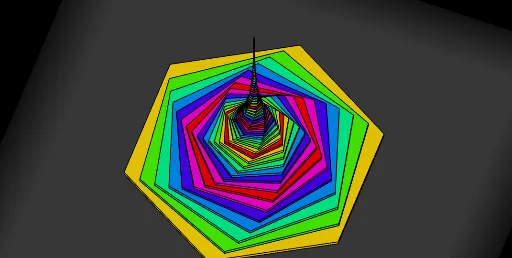
This example demonstrates a dynamic twisted tower structure composed of multiple polygons, showcasing their combination and transformation through adjustable parameters. Core mathematical concepts include polygon construction, coordinate geometry, sequence application, geometric transformations, and potential calculus concepts. It utilizes GeoGebra commands like Sequence, Polygon, and Element to dynamically visualize geometric changes. Suitable for high school and above, it aids in understanding polygon combinations, geometric transformations, and sequence applications.
GeoGebra Commands & Parameters
Sequence((x(O) + (R * cos(i)), y(O) + (R * sin(i)), z(O)), i, 0, (2 * π), (2 * π / n)) → l2Polygon(l2) → poly1Sequence(Prism[Translate[Dilate[Rotate[poly1, (k * 6°)], 0.9^(k)], Vector[(0, 0, (k * 0.2))]], 0.2], k, 0, 60, 2) → l1Sequence(Prism[Translate[Dilate[Rotate[poly1, (k * 6°)], 0.9^(k)], Vector[(0, 0, (k * 0.2))]], 0.2], k, 0, 60) → l3Element(l3, A1) → B1Element(l3, A2) → B2Element(l3, A3) → B3Element(l3, A4) → B4Element(l3, A5) → B5Element(l3, A6) → B6Element(l3, A7) → B7Element(l3, A8) → B8Element(l3, A9) → B9Element(l3, A10) → B10Element(l3, A11) → B11Element(l3, A12) → B12Element(l3, A13) → B13Element(l3, A14) → B14Element(l3, A15) → B15Element(l3, A16) → B16Element(l3, A17) → B17Element(l3, A18) → B18Element(l3, A19) → B19Element(l3, A20) → B20Element(l3, A21) → B21Element(l3, A22) → B22Element(l3, A23) → B23Element(l3, A24) → B24Element(l3, A25) → B25Element(l3, A26) → B26Element(l3, A27) → B27Element(l3, A28) → B28Element(l3, A29) → B29Element(l3, A30) → B30Element(l3, A31) → B31Element(l3, A32) → B32Element(l3, A33) → B33Element(l3, A34) → B34Element(l3, A35) → B35Element(l3, A36) → B36Element(l3, A37) → B37Element(l3, A38) → B38Element(l3, A39) → B39Element(l3, A40) → B40Element(l3, A41) → B41Element(l3, A42) → B42Element(l3, A43) → B43Element(l3, A44) → B44Element(l3, A45) → B45Element(l3, A46) → B46Element(l3, A47) → B47Element(l3, A48) → B48Element(l3, A49) → B49Element(l3, A50) → B50Element(l3, A51) → B51Element(l3, A52) → B52Element(l3, A53) → B53Element(l3, A54) → B54Element(l3, A55) → B55Element(l3, A56) → B56Element(l3, A57) → B57Element(l3, A58) → B58Element(l3, A59) → B59Element(l3, A60) → B60
AI Drawing Prompt Reference
Create a dynamic twisted tower structure composed of multiple polygons, demonstrating their combination and transformation through adjustable parameters. Start by constructing a polygon based on parameters, then iteratively rotate, scale, and translate these polygons along the vertical axis to stack them layer by layer, forming a complex tower where each layer undergoes scaling and translation transformations.
The prompt above was compiled from the original drawing commands and is for reference only.