
Try It: Writing Logarithmic Functions from Graph Clues
Loading the math board and drawing, please wait…
In collections
Graphing Logarithmic Functions
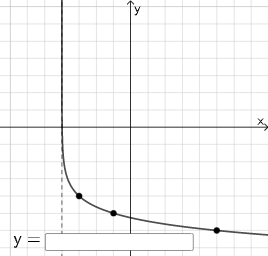
This interactive example guides students to write down a logarithmic function and match it to the displayed curve, building intuition about how parameters control the graph. It focuses on logarithmic functions such as y=log_a(x) and the transformed form y=log_a(x-h)+k, emphasizing how the base and vertical/horizontal shifts determine the curve’s features (including the asymptotic behavior and key intercepts). Construction relies on GeoGebra commands and structures reflected in the build: Intersect to locate crucial points from geometry/coordinates, Vector to encode displacement or directional information, Random and RandomElement to generate practice variations, and Textfield/InputBox1 to show or accept function expressions and prompts. The listed objects (including points/expressions like g, h, k1, A, G, u, k, l, m, n, o, q, eq2, M, N, r) together with button1 manage the exercise state and updates, enabling a “graph-to-formula” workflow. Suitable for upper secondary and early college courses on functions and logarithms, as well as classroom drills and self-paced practice.
GeoGebra Commands & Parameters
Intersect(xAxis, yAxis) → GVector(G, A) → uRandom(2, 6) → lRandomElement({-1, 1}) → mRandom(-6, 6) → nRandom(-6, 6) → oTextfield(r) → InputBox1
AI Drawing Prompt Reference
Create a practice-style graph for writing a logarithmic function from visual clues. Start with the coordinate axes meeting at a reference point, then draw a directional displacement from this reference point toward another given point to indicate horizontal/vertical shifts. Introduce variable parameters for the transformation by generating a choice of sign and several numbers within specified ranges, so the resulting curve can be matched using these clues. Display a parameter expression or placeholder in an input box for the learner to enter the logarithmic function form. Focus on using the intercept/shift information to connect the graph with the function form.
The prompt above was compiled from the original drawing commands and is for reference only.