
Exploring Monotonicity of Quadratic Functions by Changing the Parabola
Loading the math board and drawing, please wait…
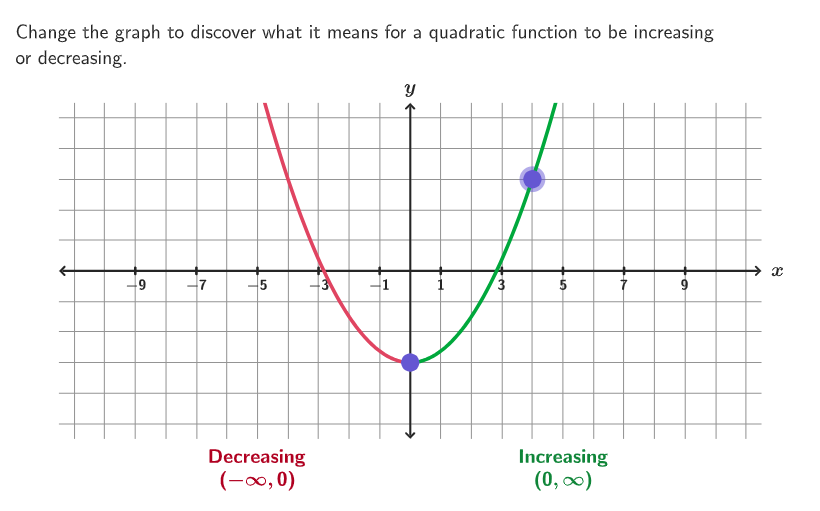
This GeoGebra example lets students interactively move key points to change a quadratic function’s parabola shape (opening upward or downward), then observe which x-intervals the function is increasing or decreasing. It supports open-ended prompts about what happens when points align horizontally/vertically and whether a parabola can be made to be only increasing or only decreasing. The core math ideas are quadratic graphs, vertex/top orientation, and function monotonicity on intervals. Construction and interaction in the setup use commands such as Polygon and Segment (for guiding geometry/structure), Point and Sequence (to create and manage draggable points), If (conditional logic for states), Translate (moving points), and Text (displaying questions/instructions like textQuestion and multiple response text fields). Circle/circlePixels and additional positioned objects help emphasize key visual cues. Suitable for grades 9–12 and for graphing/function interpretation lessons focused on describing increasing/decreasing intervals.
GeoGebra Commands & Parameters
Corner(5) → AppSizePolygon({ViewCorner1_{1}, (x(ViewCorner3_{1}), y(ViewCorner1_{1})), ViewCorner3_{1}, (x(ViewCorner1_{1}), y(ViewCorner3_{1}))}) → q1_{1}Text("x", (12, 0.1), true, true, 0, 0) → text1_{1}Flatten(Sequence[Sequence[(ii, jj), ii, -11, 11], jj, -5, 5]) → gridPointsPoint(gridPoints) → P2Text("y", (yax, 6), true, true, 0, 0) → text2_{1}Sequence((-yax) + ii - 10, ii, 0, 20) → xNums, {-10, -9, -8, -7, -6, -5, -4, -3, -2, -1, 0, 1, 2, 3, 4, 5, 6, 7, 8, 9, 10}Sequence(Text[(-yax) + ii - 10, (-10 + ii, 0), true, true, 0, -1], ii, If[Mod[yax, 2] ≟ 0, 1, 0], 20, 2) → xAxisNumbersSequence(Segment[(ii, -0.1), (ii, 0.1)], ii, If[Mod[yax, 2] ≟ 1, -10, -9], 10, 2) → ticksPoint(gridPoints) → P1If(y(P1) ≠ y(P2), (("(-\infty," * x(P1)) * ")")) → Text1'If(y(P1) ≠ y(P2), (("(" * x(P1)) * ",\infty)")) → Text2'Text(Text1, Pos1, true, true, 0, 0) → text1Text(Text2, Pos2, true, true, 0, 0) → text2Text(Text2', Pos4, true, true, 0, 0) → text3Text(Text1', Pos3, true, true, 0, 0) → text4If(f(x(P1) - 1) ≟ f(x(P1)), 2, If[f(x(P1) - 1) ≤ f(x(P1)), 3, 1]) → colorLeftIf(f(x(P1) + 1) ≟ f(x(P1)), 2, If[f(x(P1) + 1) ≤ f(x(P1)), 1, 3]) → colorRightTranslate(hGuideline, Vector[(Vector[Corner[1], Corner[3]] / 500 * 16)]) → hGuideline'Segment((yax, y(ViewCorner1_{1}) + 0.05), (yax, y(ViewCorner3_{1}) - 0.05)) → yAxisFake_{1}Segment((x(ViewCorner1_{1}) + 0.05, 0), (x(ViewCorner3_{1}) - 0.05, 0)) → xAxisFake_{1}circlePixels(P2, 9 + (7 * pulsing), Corner[1], Corner[3], Corner[5]) → pulsingObject
AI Drawing Prompt Reference
Draw a coordinate plane with a grid, clear axes with numbered ticks. Place two draggable points on the grid; their positions define a quadratic parabola whose opening direction changes based on their relative locations. On both sides of the parabola, show two interval labels indicating where the function is increasing or decreasing, with text updating dynamically from the points' x-coordinates. Use different colors to mark the left and right sides of the parabola for monotonicity, and add a pulsing circular dot as a visual cue. The overall graph is for exploring how the monotonicity of a quadratic function changes with vertex position.
The prompt above was compiled from the original drawing commands and is for reference only.