
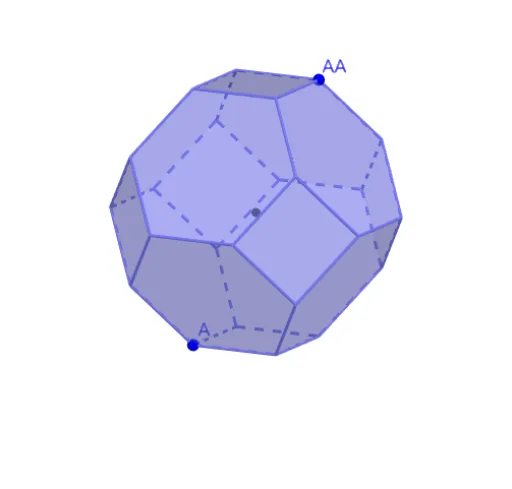
Truncated Octahedron by chris cambré
Loading the math board and drawing, please wait…
This example demonstrates the construction of a truncated octahedron. It involves transformations in solid geometry. Using commands such as Circle, Intersect, Rotate, Polygon, Line, OrthogonalLine, Angle, Plane, Mirror, Sequence, and Midpoint, a geometric model of the truncated octahedron can be constructed. Suitable for teaching and learning in high school or university solid geometry courses.
GeoGebra Commands & Parameters
Circle(OO, 1, xOyPlane) → cIntersect(yAxis, c, 2) → ARotate(A, 90°) → BPolygon(A, B, 4, xOyPlane) → veelhoek1, f, g, h, i, C, DPolygon(B, A, 6, xOyPlane) → veelhoek2, j, H, k, l, m, n, p, E, F, GPolygon(A, D, 6, xOyPlane) → veelhoek3, q, L, r, s, t, a, b, I, J, KPolygon(D, C, 6, xOyPlane) → veelhoek4, d, P, e, f_1, g_1, h_1, i_1, M, N, OPolygon(C, B, 6, xOyPlane) → veelhoek5, j_1, T, k_1, l_1, m_1, n_1, p_1, Q, R, SCircle(j_1, Q) → c_1Circle(j, H) → d_1Intersect(c_1, d_1) → U, V, ,Line(C, B) → q_1OrthogonalLine(Q, q_1, xOyPlane) → r_1Intersect(q_1, r_1) → WAngle(Q, W, V) → αRotate(veelhoek5, (-α), g) → schuin1Line(OO, OOO) → asRotate(veelhoek2, (-α), f) → veelhoek2'Rotate(veelhoek3, (-α), i) → veelhoek3'Rotate(veelhoek4, α, d) → veelhoek4'Rotate(F, (-α), f) → FFRotate(FF, (-(90°)), as) → FFFRotate(FF, (-(180°)), as) → FFFFPlane(FFF, FFFF, FF) → oMirror(schuin1, o) → schuin1'Sequence(Rotate[schuin1', (n * 90°), as], n, 1, 3) → lijst_1Midpoint(FF, FFFF) → MidMirror(veelhoek1, Mid) → veelhoek1'Rotate(G, α, j) → G'Rotate(R, (-α), g) → R'Mirror(V, o) → V'Polygon(G', V, R', V') → vierhoek1, g', v, r', v'Sequence(Rotate[vierhoek1, (n * 90°), as], n, 1, 3) → lijst_2Mirror(A, Mid) → AA
AI Drawing Prompt Reference
Construct a truncated octahedron by first drawing a circle on the xOy plane, then using rotations and polygons to create each face, and finally adjusting the positions of the faces with reflections and translations to form a complete truncated octahedron.
The prompt above was compiled from the original drawing commands and is for reference only.