
Truncated Cone Exploration
Loading the math board and drawing, please wait…
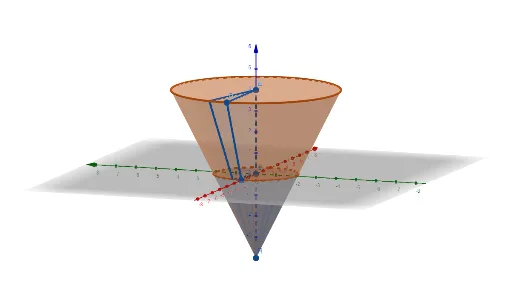
This example demonstrates the geometric construction and properties of a truncated cone, involving core concepts in solid geometry, rotational solids, volume calculation, slope, and functional relationships. Key GeoGebra commands used include Polygon, Cone, and Rotate with objects A, B, C, D, q1, a, b, c, d, E, F, e, f, g, n, q1', G, H, h, k, i. Suitable for high school geometry teaching and construction practice.
GeoGebra Commands & Parameters
Polygon(A, B, C, D) → q1, a, b, c, dCone(E, F, 4) → e, f, gRotate(q1, (-n), a) → q1'Cone(G, H, 2) → h, k, i
AI Drawing Prompt Reference
Draw a truncated cone. First, create a quadrilateral with points A, B, C, and D. Then, draw a cone with base center E and F, and height 4. Next, rotate the quadrilateral 45 degrees to form the upper base of the truncated cone. Finally, draw another cone with base center G and H, and height 2, to form the lower base of the truncated cone.
The prompt above was compiled from the original drawing commands and is for reference only.