
Truchet Tile: Quarter Circle + Quarter Square
Loading the math board and drawing, please wait…
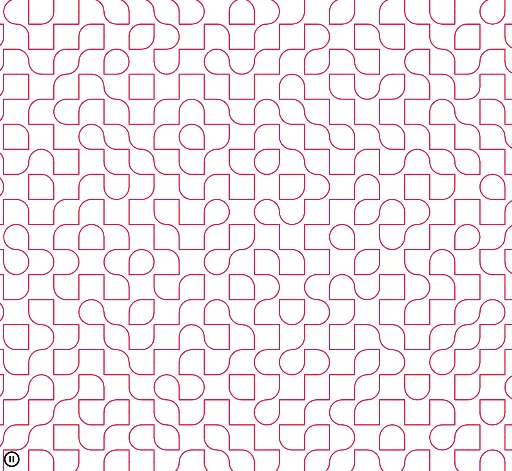
This example demonstrates the construction of a Truchet tile using quarter circles and quarter squares, showcasing symmetry and geometric transformations. Key math concepts include circles, squares, symmetry, geometric transformations, and stochastic processes. The construction involves GeoGebra commands like Point, Intersect, CircleArc, PolyLine, and Sequence. Suitable for high school mathematics education to explore geometric transformations and stochastic processes in graphic design.
GeoGebra Commands & Parameters
Point(xAxis) → BPoint(yAxis) → CPoint(yAxis) → DIntersect(xAxis, yAxis) → EPoint(xAxis) → FCircleArc(A, C, B) → cPolyLine(D, E, F) → fSequence(Sequence[Translate[Rotate[{c, f}, RandomElement[{0, π / 2, π, (3 * π / 2)}]], (a, b)], a, -20, 20, 2], b, -20, 20, 2) → l1
AI Drawing Prompt Reference
Create a Truchet tile composed of a quarter circle and a quarter square centered at the intersection of the axes, rotate and translate it randomly to generate multiple tiles, demonstrating symmetry and geometric transformations.
The prompt above was compiled from the original drawing commands and is for reference only.