
Truchet's Cube: Dynamic Geometric Construction and Rotation Animation
Loading the math board and drawing, please wait…
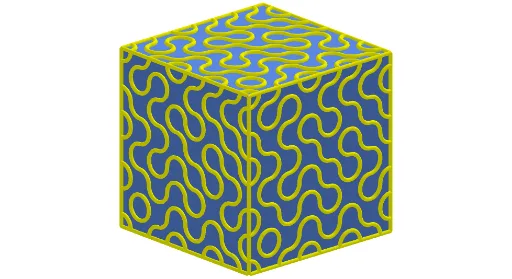
① This example demonstrates how to construct a 3D geometric model called 'Truchet's cube' in GeoGebra, based on a variant of Truchet tiles, showing dynamic changes on the cube's surface through rotation and animation. ② Core mathematical concepts include solid geometry (cube, polygonal faces), circular arcs, midpoints, rotation and translation transformations, as well as vectors and sequences. ③ Construction highlights: from the summary, commands such as Polygon, Midpoint, CircleArc, Rotate, Sequence, Point, Cube, and Translate are used, involving objects like A, B, poly1, f, g, h, i, C through R, l1 to l4, faceIJMN, etc., with an animation slider controlling rotation to create dynamic effects. ④ Suitable for high school or early university geometry teaching, useful for understanding 3D transformations, dynamic geometric construction, and the aesthetic combination of mathematics and art.
GeoGebra Commands & Parameters
Polygon(A, B, 4) → poly1, f, g, h, i, C, DMidpoint(h) → EMidpoint(g) → FMidpoint(f) → GMidpoint(i) → HCircleArc(C, E, F) → cCircleArc(A, G, H) → dRotate({c, d}, RandomElement[l1]) → l2Sequence(Sequence[Translate[Rotate[{c, d}, RandomElement[l1]], (a, b)], a, -12, 12, 4], b, -12, 12, 4) → l3Polygon(I, J, 4) → poly2, j, k, l, m, K, LRotate(l3, 90°, j) → l3'Sequence(Rotate[l3', i, zAxis], i, 0, (2 * π), (2 * π / 4)) → l4Point(Circle[J, Distance[I, J], Segment[I, J]]) → MCube(I, J, M) → a, N, faceMNRQ, faceOPQR, arêteIN, arêteIJ, arêteJM, arêteMN, arêteIO, arêteNR, arêteOR, arêteOP, O, arêteJP, arêtePQ, arêteMQ, arêteQR, P, Q, R, faceIJMN, faceINRO, faceIJPO, faceJMQPTranslate(l3, Vector[I, O]) → l3'_{1}
AI Drawing Prompt Reference
Create a Truchet's cube with four square faces, showing dynamic changes through rotation and animation. Start by drawing four vertices A, B, I, J, then create four arcs c and d, rotate and translate these arcs to generate dynamic effects. Next, draw face IJMN, rotate this face around J to create a dynamic rotation effect. Finally, construct cube a, including faces MNRQ, INRO, IJPO, and JMQP, to display the dynamic rotation of the cube.
The prompt above was compiled from the original drawing commands and is for reference only.