
Cylinder Net with Slider
Loading the math board and drawing, please wait…
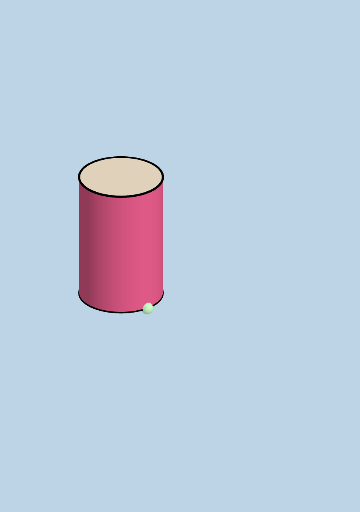
① This example demonstrates the dynamic unfolding and rolling of a cylinder's surface using sliders, showing how a cylinder consists of a rectangular lateral face and two circular bases. ② Core mathematical concepts include solid geometry, cylinder nets, surface area, and the effect of parameter changes on the 3D shape. ③ Construction highlights: using GeoGebra commands such as Cylinder, Slider, Rotate, Translate, Dilate, Polygon, CircleArc, Surface, Intersect, Midpoint, and Mirror to create the cylinder and its net, with interactive sliders for radius (r) and height (h) to animate the transformation. ④ Suitable for middle and high school geometry classes, math labs, or exploratory learning to visualize the relationship between 3D solids and their 2D nets.
GeoGebra Commands & Parameters
Cylinder(A, C, r) → a, c, d, bLine(D, E) → fIntersect(f, d, 1) → FSphere(F, r) → eIntersect(f, e) → G, HPlane(G, F, C) → gRotate(C, If[0 < i ≤ 1, (i * pi / 2), pi / 2], D, g) → C'Rotate(d, If[0 < i ≤ 1, (i * pi / 2), pi / 2], D, g) → d'Rotate(dd, If[0 < i ≤ 1, (i * pi / 2), pi / 2], D, g) → dd'Dilate(C, If[1 < i ≤ 2, 2 - i, 0], I) → C'_1Dilate(C, If[1 < i ≤ 2, 2 - i, 0], J) → C'_2Vector(C, C'_1) → uVector(C, C'_2) → vTranslate(dd, u) → dd'_1Translate(dd, v) → dd'_2Translate(K, u) → K'Translate(K, v) → K'_1Rotate(K', If[1 < i ≤ 2, ((i - 1) * pi), pi], C'_1) → K''Rotate(K'_1, If[1 < i ≤ 2, ((-(i - 1)) * pi), (-pi)], C'_2) → LTranslate(D, u) → D'Translate(D, v) → D'_1Polygon(D', D'_1, N, M) → poly1, d'_1, d'_2, n, mSegment(K'', Q) → jCircleArc(P, Q, M) → kSegment(L, S) → lCircleArc(R, N, S) → pCircleArc(C'_2, D'_1, L) → qCircleArc(C'_1, K'', D') → sPlane(T, A, B) → oRotate(C', If[2 < i ≤ 3, ((i - 2) * pi / 2), pi / 2], E, g) → C''Rotate(poly1, If[2 < i ≤ 3, ((i - 2) * pi / 2), pi / 2], E, g) → poly1'Rotate(d', If[2 < i ≤ 3, ((i - 2) * pi / 2), pi / 2], E, g) → d'_3Rotate(dd', If[2 < i ≤ 3, ((i - 2) * pi / 2), pi / 2], E, g) → dd'_3Rotate(K'', If[2 < i ≤ 3, ((i - 2) * pi / 2), pi / 2], E, g) → K'''Rotate(Q, If[2 < i ≤ 3, ((i - 2) * pi / 2), pi / 2], E, g) → Q'Segment(K''', Q') → j'Rotate(L, If[2 < i ≤ 3, ((i - 2) * pi / 2), pi / 2], E, g) → L'Rotate(S, If[2 < i ≤ 3, ((i - 2) * pi / 2), pi / 2], E, g) → S'Segment(L', S') → l'Dilate(C'', If[3 < i ≤ 4, 4 - i, 0], U) → C'''Vector(C'', C''') → wDilate(C'', If[3 < i ≤ 4, 4 - i, 0], V) → C'''_1Vector(C'', C'''_1) → tTranslate(Z, w) → Z'Translate(Z, t) → Z'_1Translate(W, w) → W'Translate(W, t) → W'_1Rotate(W', If[3 < i ≤ 4, ((-(i - 3)) * pi), (-pi)], C''') → W''CircleArc(C''', Z', W'') → c_1Segment(Z, Z') → f_1Rotate(W'_1, If[3 < i ≤ 4, ((i - 3) * pi), pi], C'''_1) → A_1CircleArc(C'''_1, Z'_1, A_1) → d_1Segment(Z, Z'_1) → g_1Segment(R, N) → h_1Angle(N, R, S) → αCurveCartesian(x(C'_2) + (r * cos(t)), y(C'_2) + (r * sin(t)), z(C'_2), t, pi / 2, pi / 2 + α) → a_1Vector(A, C) → ttSurface(x(C'_2) + (r * cos(t)) - (u * x(tt)), y(C'_2) + (r * sin(t)) - (u * y(tt)), z(C'_2) - (u * z(tt)), u, 0, 1, t, pi / 2, pi / 2 + α) → b_1Surface((-x(C'_2)) - (r * cos(t)) - (u * x(tt)), y(C'_2) + (r * sin(t)) - (u * y(tt)), z(C'_2) - (u * z(tt)), u, 0, 1, t, pi / 2, pi / 2 + α) → e_1Midpoint(L', S') → B_1Midpoint(K''', Q') → C_1Line(B_1, C_1) → i_1Mirror(d_1, i_1) → k_1Mirror(c_1, i_1) → p_1Mirror(Z, i_1) → Z'_2Mirror(Z', i_1) → Z''Segment(Z'_2, Z'') → j_1Mirror(Z, i_1) → Z'_3Mirror(Z'_1, i_1) → D_1Segment(Z'_3, D_1) → l_1
AI Drawing Prompt Reference
Draw a cylinder net with two circular bases and a rectangular side. Use sliders to adjust the radius and height of the cylinder, and demonstrate how the cylinder unfolds into a 2D shape through rotations, translations, and dilations. Start by creating the cylinder, then generate its net, and finally control the cylinder's shape changes with the sliders.
The prompt above was compiled from the original drawing commands and is for reference only.