
Triple Integral in Spherical Coordinates
Loading the math board and drawing, please wait…
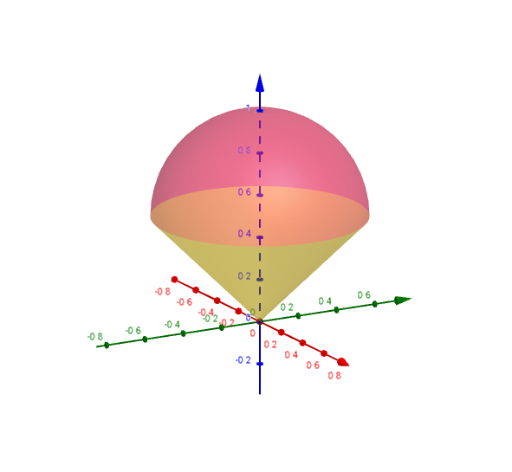
This example demonstrates how to perform a triple integral in spherical coordinates. Key mathematical concepts include spherical coordinates, triple integrals, and their applications in geometry and physics. Using GeoGebra commands like Surface and Segment, users can visually understand the construction of the triple integral. Suitable for university mathematics students and researchers in related fields.
GeoGebra Commands & Parameters
Surface(((f(ϕ) * sin(ϕ)) * cos(θ)), ((f(ϕ) * sin(ϕ)) * sin(θ)), (f(ϕ) * cos(ϕ)), ϕ, 0, π / 4, θ, 0, (2 * π)) → topSurface(((ρ * sin(π / 4)) * cos(θ)), ((ρ * sin(π / 4)) * sin(θ)), (ρ * cos(π / 4)), ρ, 0, cos(π / 4), θ, 0, (2 * π)) → bottomSegment(O, (r * A)) → segmentSurface((((ρ * sin(ϕ)) * cos(π / 4)) * cos(ϕ)), (((ρ * sin(ϕ)) * sin(π / 4)) * cos(ϕ)), ((ρ * cos(ϕ)) * cos(ϕ)), ρ, 0, 1, ϕ, 0, s) → partitionSurface((((ρ * sin(ϕ)) * cos(t)) * cos(ϕ)), (((ρ * sin(ϕ)) * sin(t)) * cos(ϕ)), ((ρ * cos(ϕ)) * cos(ϕ)), ρ, 0, 1, ϕ, 0, π / 4) → solid
AI Drawing Prompt Reference
Draw a triple integral in spherical coordinates. First, draw the upper hemisphere with ϕ ranging from 0 to π/4 and θ from 0 to 2π. Then, draw the lower hemisphere with ρ ranging from 0 to cos(π/4) and θ from 0 to 2π. Next, draw a line segment from the origin to point A. Finally, draw a cylindrical surface with ρ ranging from 0 to 1 and ϕ from 0 to s, and a conical surface with ρ ranging from 0 to 1 and ϕ from 0 to π/4.
The prompt above was compiled from the original drawing commands and is for reference only.