
Area Between Two Polar Curves
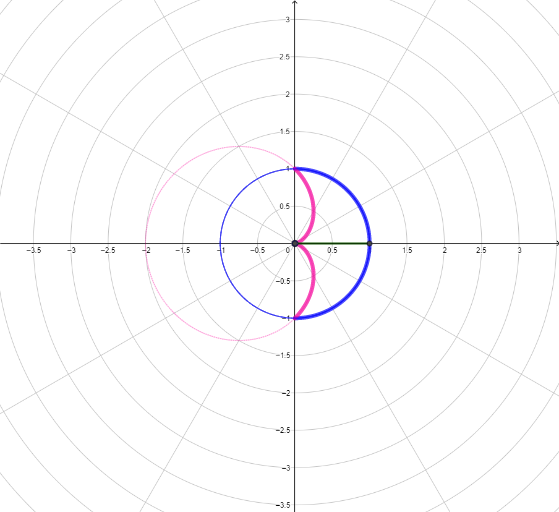
Loading the math board and drawing, please wait…
This example demonstrates how to calculate the area between two polar curves using integral calculus. Key mathematical concepts include polar coordinates, integration, and area calculation. It utilizes commands such as CurveCartesian, Sequence, Textfield, and Point in GeoGebra. Suitable for high school mathematics education and learning, particularly in calculus and coordinate geometry.
GeoGebra Commands & Parameters
CurveCartesian((f(t) * cos(t)), (f(t) * sin(t)), t, a, b) → cSequence(c(i), i, a, b, d) → l1, {(6.123233995736766E-17, -1)}Sequence(Segment[(0, 0), Element[l1, i]], i, 1, n + 1) → l2, {1}Textfield(a) → InputBox2Textfield(b) → InputBox3Sequence(Circle[(0, 0), Element[l2, i]], i, 1, n + 1) → l3, {x² + y² = 1}Sequence(Sector[Element[l3, i + 1], a + (i * d), a + (i * d) + d], i, 0, n - 1) → l4, {}Textfield(g) → InputBox4Textfield(f) → InputBox1Textfield(a) → InputBox5Textfield(b) → InputBox6CurveCartesian((g(t) * cos(t)), (g(t) * sin(t)), t, i, j) → eTextfield(i) → InputBox7Textfield(j) → InputBox8Point(eq1) → ACurveCartesian((f(t) * cos(t)), (f(t) * sin(t)), t, (-10 * π), (10 * π)) → lCurveCartesian((g(t) * cos(t)), (g(t) * sin(t)), t, (-10 * π), (10 * π)) → mIf(abs(f(k)) ≤ abs(g(o)), Segment[B, D], Segment[B, C]) → pSegment(C, D) → qSegment(B, D) → sSegment(B, C) → t
AI Drawing Prompt Reference
On the same coordinate plane, draw two polar curves defined by two given radial functions using parametric angle equations across a wide angle range. Add a reference partition near the origin by constructing concentric circles and wedge-like sectors using a chosen start angle, end angle, and step size. For each partition, locate the relevant boundary points on the two curves according to a selection rule (which curve lies closer), then connect the resulting boundary points with line segments so the region between the two polar curves is visually indicated. Include a few labeled input controls for the key parameters such as the start and end angles and the functions.
The prompt above was compiled from the original drawing commands and is for reference only.