
Numerical Solutions to Differential Equations Interactive Demo
Loading the math board and drawing, please wait…
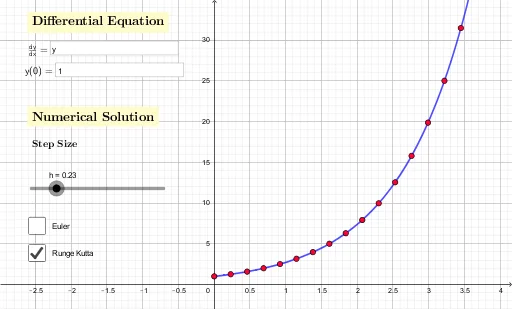
①This GeoGebra example demonstrates the process of numerically solving differential equations through an interactive interface, allowing users to input initial values, step size, and the function expression to observe the generation and variation of numerical solution sequences. ②Core mathematical concepts include ordinary differential equations, numerical approximation methods such as Euler's method or Runge-Kutta, initial value problems, and the influence of step size on accuracy. ③Construction highlights: from the summary, it uses Textfield, InputBox, multiple point objects (A1 to A17, B1 to B17), and variables y0, f, h, with sliders or input boxes to control parameters, dynamically generating point sequences and possibly plotting polylines or curves. ④Suitable for university-level numerical analysis or ODE courses, or advanced high school math extensions, to understand the difference between analytical and numerical solutions, explore step-size convergence, and serve as a classroom demonstration or self-study tool.
GeoGebra Commands & Parameters
Textfield(f) → InputBox1Textfield(y0) → InputBox2
AI Drawing Prompt Reference
Create an interactive diagram demonstrating numerical solutions to differential equations. The main area is a coordinate plane with x-axis and y-axis. Place two input boxes on the side or top for entering the differential equation expression and the initial value. Starting from the initial point, generate a sequence of discrete points at equal step intervals, connected by a polyline to represent the approximate numerical solution. Also draw a smooth dashed curve nearby as the analytical solution for comparison. Include a slider or input box to adjust the step size; changing it alters the spacing of points and the shape of the polyline, showing how step size affects accuracy.
The prompt above was compiled from the original drawing commands and is for reference only.