
Trigonometric Ratios of General Angles Self Assessment
Loading the math board and drawing, please wait…
In collections
Self Assessment MCQs Collection
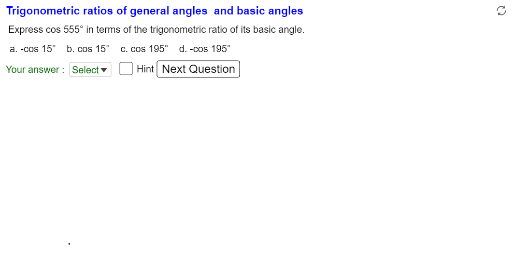
This example demonstrates the calculation and visualization of trigonometric ratios for any angle, focusing on general angles greater than 360 degrees. It involves core concepts like reference angles and trigonometric functions, constructed using GeoGebra commands such as Intersect, Angle, and Segment. Ideal for high school mathematics education and self-study.
GeoGebra Commands & Parameters
Intersect(c, xAxis, 1) → CIntersect(c, xAxis, 2) → AIntersect(xAxis, yAxis) → OIf(m, θ_{debug}, If[counter < 11, (15 * Random[25, 48]), If[counter < 21, (5 * Random[73, 288]), (15 * Random[-48, -25])]]) → θ_{random}Angle(A, O, P) → ReferenceAngle1Angle(C, O, P) → ReferenceAngle2If(ReferenceAngle1 < 90.01°, ReferenceAngle1, ReferenceAngle2) → E3Angle(A, O, P) → α_+Segment(O, A) → aSegment(O, P) → bAngle(A, O, P_o) → θ_cAngle(P, O, A) → α_-Segment(O, C) → dIf(ReferenceAngle1 ≟ 0°, 1, floor((θ_o - 0.01) / 90) + 1) → nquadIf(Mod[nquad, 4] ≟ 0, 4, Mod[nquad, 4]) → quadElement(ListQuad, quad) → P_qPolygon(O, P, Q) → poly1, p_x, o, pAngle(O, Q, P) → rtAngledElement(ListGenAngle, quad) → P_gElement(ListRefAngle, quad) → P_fMidpoint(O, Q) → OQmidMidpoint(P, Q) → PQmidMidpoint(O, P) → OPmidAngle(A, O, P_o) → θ_{c2}Angle(A, O, P_o) → θ_{c3}Angle(A, O, P_o) → θ_{c4}Textfield(θ_o) → inputBox1If(α_+ ≟ 90° ∨ α_+ ≟ 270°, (θ_r + ((round(θ_r / π, 0) - 1) * π)) / 2, (θ_r + (round(θ_r / π, 0) * π)) / 2) → θ_tMidpoint(P_{rless20deg}, T_{basicangle}) → T_{genangle}Segment((x(C) - 0.3, y(C)), (x(A) + 0.3, y(A))) → xaxislineMirror(P_{xaxisarrow}, k) → P_{yaxisarrow}Mirror(xaxisline, k) → yaxislineIf(ReferenceAngle1 < 90.01°, ReferenceAngle1, ReferenceAngle2) → E4If(ReferenceAngle1 < 90.01°, ReferenceAngle1, ReferenceAngle2) → E5If(quad ≟ 1, "", If[quad ≟ 4, "", "-"]) → H4If(quad ≟ 1, "", If[quad ≟ 3, "", "-"]) → H5If(quad ≟ 1, "positive", If[quad ≟ 2, "positive", "negative"]) → G3If(quad ≟ 1, "positive", If[quad ≟ 4, "positive", "negative"]) → G4If(quad ≟ 1, "positive", If[quad ≟ 3, "positive", "negative"]) → G5If(abs(C3) ≟ 0, 0, If[C3 > 0, If[C3 - (floor(C3 / 360) * 360) ≟ 0, 360, C3 - (floor(C3 / 360) * 360)], If[abs(C3) - (floor(abs(C3) / 360) * 360) ≟ 0, 360, 360 - (abs(C3) - (floor(abs(C3) / 360) * 360))]]) → D3If(abs(C4) ≟ 0, 0, If[C4 > 0, If[C4 - (floor(C4 / 360) * 360) ≟ 0, 360, C4 - (floor(C4 / 360) * 360)], If[abs(C4) - (floor(abs(C4) / 360) * 360) ≟ 0, 360, 360 - (abs(C4) - (floor(abs(C4) / 360) * 360))]]) → D4If(abs(C5) ≟ 0, 0, If[C5 > 0, If[C5 - (floor(C5 / 360) * 360) ≟ 0, 360, C5 - (floor(C5 / 360) * 360)], If[abs(C5) - (floor(abs(C5) / 360) * 360) ≟ 0, 360, 360 - (abs(C5) - (floor(abs(C5) / 360) * 360))]]) → D5Random(1, 3) → selecttrigrationumIf(ReferenceAngle1 < 90.0100000000002°, ReferenceAngle1, ReferenceAngle2) → E1If(abs(C1) ≟ 0, 0, If[C1 > 0, If[C1 - (floor(C1 / 360) * 360) ≟ 0, 360, C1 - (floor(C1 / 360) * 360)], If[abs(C1) - (floor(abs(C1) / 360) * 360) ≟ 0, 360, 360 - (abs(C1) - (floor(abs(C1) / 360) * 360))]]) → D1Cell(7, 2 + selecttrigrationum) → G1If(quad ≟ 1, {J1, K1}, {J1, K1, L1, M1}) → listSelectedTrigChoicesRemove(listSelectedTrigChoices, {txtC1}) → listSelectedTrigChoices2Remove(listSelectedTrigChoices2, {txtC2}) → listSelectedTrigChoices3If(quad ≟ 1, {"Select", "a", "b"}, {"Select", "a", "b", "c", "d"}) → listAnswerChoiceIndexOf(Element[listShuffledChoices, SelectedIndex[listAnswerChoice]], listSelectedTrigChoices) → numListFeedbackTextfield(θ_{debug}) → InputBox1