
Trigonometric Ratios of Acute Angles (Sine/Cosine/Tangent) by suranteran
Loading the math board and drawing, please wait…
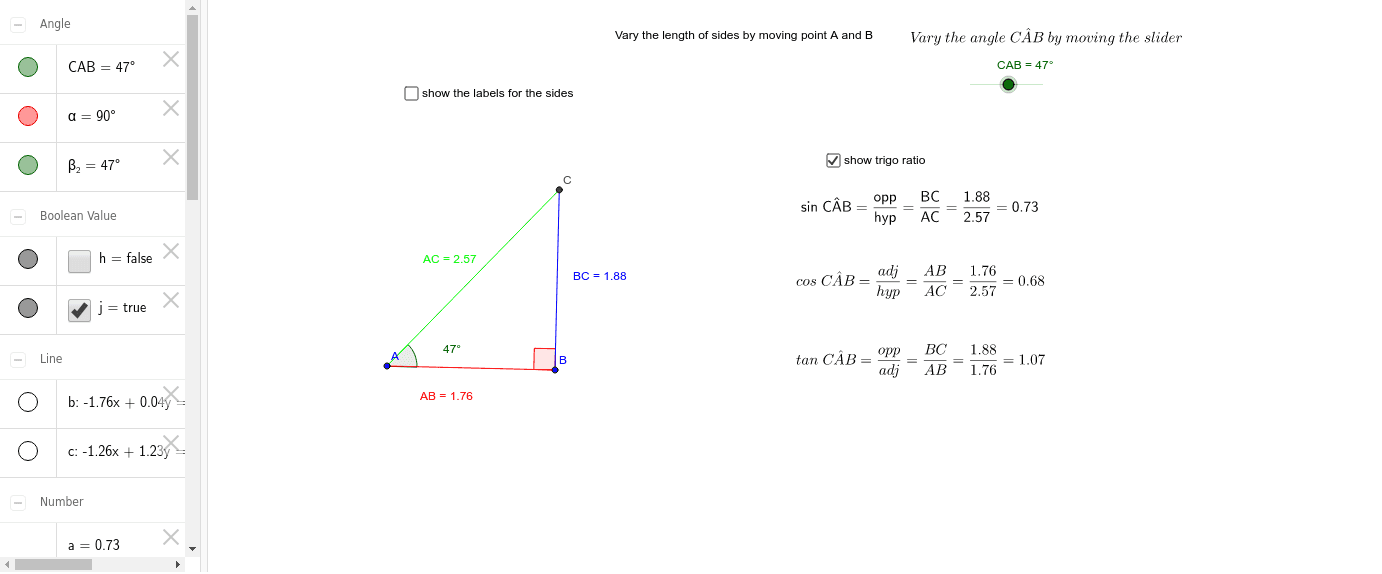
This example demonstrates how to construct a right triangle to illustrate the sine, cosine, and tangent values of acute angles. Key math concepts include the definition of trigonometric functions, relationships between side lengths in right triangles, and angle measurement. GeoGebra commands and objects like Segment, Rotate, Angle, OrthogonalLine, Line, and Intersect are used to build the triangle and calculate function values. Suitable for high school students learning the basic properties and geometric meaning of trigonometric functions.
GeoGebra Commands & Parameters
Segment(A, B) → ABRotate(B, CAB, A) → B'Angle(B, A, B') → β_2OrthogonalLine(B, AB) → bLine(A, B') → cIntersect(b, c) → CSegment(A, C) → ACSegment(B, C) → BCAngle(C, B, A) → αSegment(C, B) → fSegment(A, C) → gSegment(A, B) → i
AI Drawing Prompt Reference
Draw a right triangle with an acute angle and illustrate the sine, cosine, and tangent values of the angle. Start by drawing a line segment as one leg of the triangle, then rotate it around one endpoint to form the other leg and the right angle. Next, draw a perpendicular line from the right angle vertex to the hypotenuse and find the foot of the perpendicular. Connect the foot to the opposite vertex to create two smaller triangles. Finally, highlight the sides corresponding to sine, cosine, and tangent with different colors or dashed lines to show their ratios.
The prompt above was compiled from the original drawing commands and is for reference only.