
Trigonometric Ratios Demo by MsPond
Loading the math board and drawing, please wait…
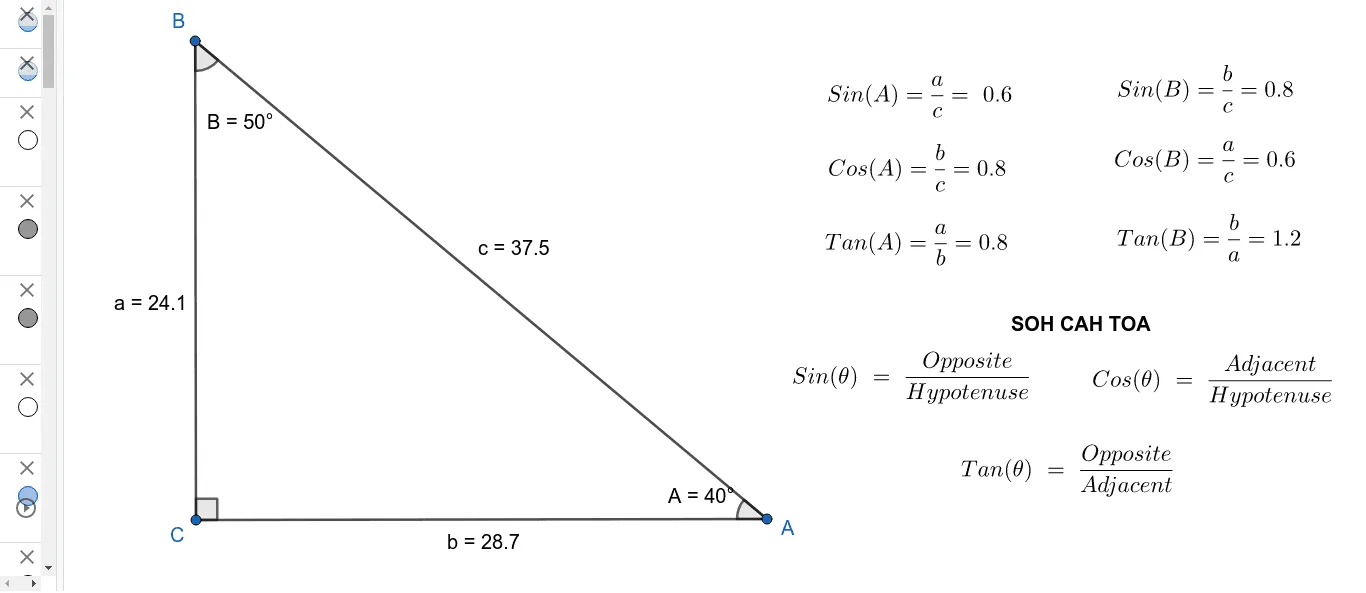
This example demonstrates the calculation and visualization of trigonometric ratios (sine, cosine, tangent) in right-angled triangles. It involves core math concepts like the definition of trigonometric functions, relationships between side lengths in right triangles, and angle measurement. Construction highlights include using GeoGebra commands such as Rotate, Angle, Segment, and Point to build right triangles and label relevant elements. Suitable for high school students learning trigonometric basics and geometric constructions.
GeoGebra Commands & Parameters
Rotate(A, 90°, B) → CAngle(A, B, C) → αSegment(B, A) → bSegment(B, C) → gPoint(g) → DSegment(D, B) → hAngle(B, D, A) → βSegment(D, A) → cAngle(D, A, B) → aRotate(A_1, 90°, B_1) → C_1Angle(A_1, B_1, C_1) → α_1Segment(B_1, A_1) → b_1Segment(B_1, C_1) → g_1Point(g_1) → D_1Segment(D_1, B_1) → h_1Angle(B_1, D_1, A_1) → β_1Segment(D_1, A_1) → c_1Angle(D_1, A_1, B_1) → a_1Rotate(A_2, 90°, B_2) → C_2Angle(A_2, B_2, C_2) → α_2Segment(B_2, A_2) → b_2Segment(B_2, C_2) → g_2Point(g_2) → D_2Segment(D_2, B_2) → h_2Angle(B_2, D_2, A_2) → β_2Segment(D_2, A_2) → c_2Angle(D_2, A_2, B_2) → a_2Rotate(A_3, 90°, B_3) → C_3Angle(A_3, B_3, C_3) → α_3Segment(B_3, A_3) → b_3Segment(B_3, C_3) → g_3Point(g_3) → D_3Segment(D_3, B_3) → h_3Angle(B_3, D_3, A_3) → β_3Segment(D_3, A_3) → c_3Angle(D_3, A_3, B_3) → a_3
AI Drawing Prompt Reference
Draw a diagram demonstrating trigonometric ratios with three right-angled triangles. Each triangle should label the hypotenuse, opposite side, and adjacent side, along with the corresponding angles and trigonometric values. Start by drawing a right triangle, then rotate the hypotenuse 90 degrees to create a second triangle, and rotate again for a third. Label each triangle's angles α, β, a, and sides b, g, h, c, displaying the calculated trigonometric values.
The prompt above was compiled from the original drawing commands and is for reference only.