
Trigonometric Ratios and Geometric Construction with GeoGebra
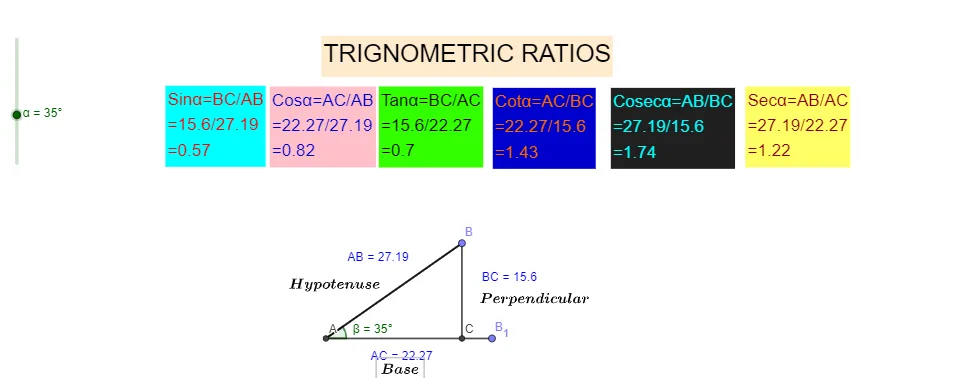
Loading the math board and drawing, please wait…
This example demonstrates how to use GeoGebra to draw triangles and calculate trigonometric ratios. Key mathematical concepts include trigonometry, geometric construction, and coordinate geometry. Construction involves using commands like Intersect, Rotate, and Angle to create triangles and measure angles. Suitable for middle or high school mathematics education to understand the practical application of trigonometric ratios in geometry.
GeoGebra Commands & Parameters
Intersect(xAxis, yAxis) → APoint(xAxis) → B_1Rotate(B_1, α, A) → BAngle(B_1, A, B) → βSegment(A, B) → fSegment(B, A) → gSegment(A, B_1) → hOrthogonalLine(B, h) → iIntersect(i, h) → CSegment(B, C) → jDistance(A, C) → distanceACDistance(A, B) → distanceABDistance(B, C) → distanceBC
AI Drawing Prompt Reference
Draw a coordinate-plane geometric construction using a central intersection point where the two axes meet. Place an initial point on the x-axis, then rotate it around the intersection by a given angle to get a second point. Connect the intersection to the rotated point to form a triangle, and mark the angle defined by the initial point, the intersection, and the rotated point. Draw the key segments between these points, then construct a perpendicular from the rotated point to the line passing through the initial point, intersecting it to obtain a third vertex. Finally, connect this third vertex to the rotated point and the intersection, and show the lengths of the relevant sides and the distances from the intersection to the vertices.
The prompt above was compiled from the original drawing commands and is for reference only.