
Trigonometric Identities from Similar Right Triangles (II)
Loading the math board and drawing, please wait…
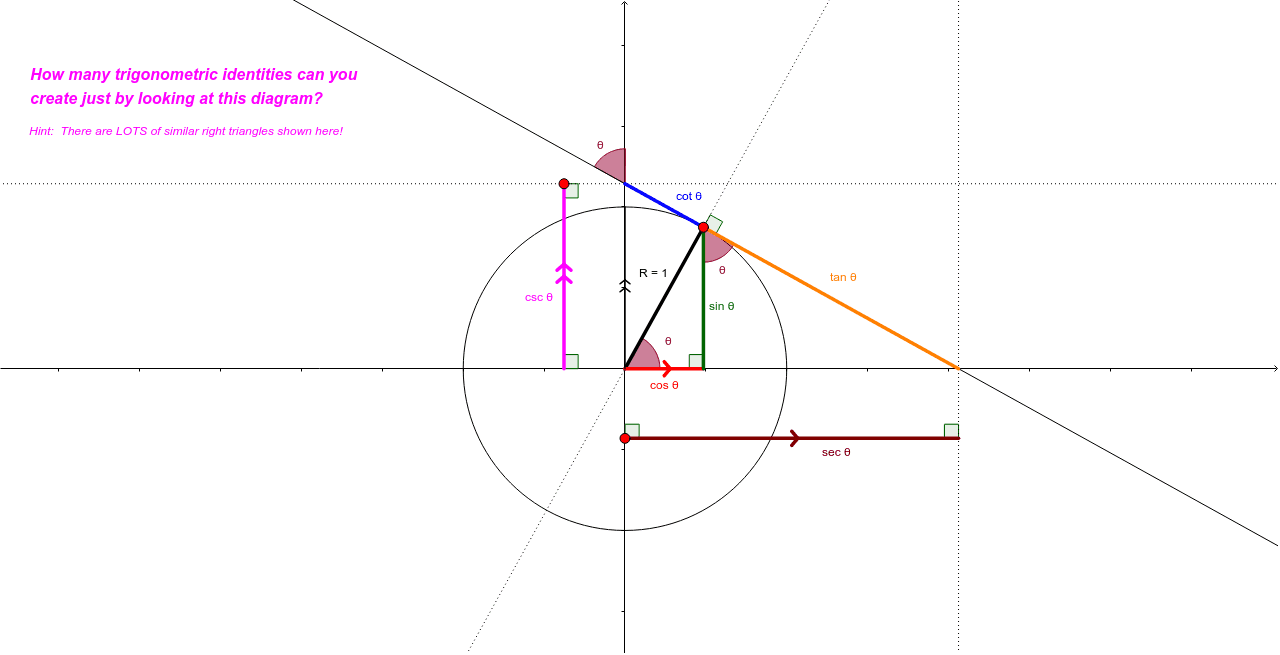
This GeoGebra applet demonstrates how to derive trigonometric identities using similar right triangles. Students can explore the relationship between similar triangles within a right triangle configuration to discover fundamental trigonometric identities. The construction uses GeoGebra commands including Circle, Point, Segment, Angle, Intersect, OrthogonalLine, and Line to create geometric figures that visually show proportional relationships between corresponding sides of similar triangles. Key mathematical concepts covered: similar triangles, proportional segments, right triangle geometry, and trigonometric function definitions. This interactive tool is suitable for middle and high school students learning trigonometry, helping them understand the connection between geometric similarity and trigonometric ratios through visual exploration.
GeoGebra Commands & Parameters
Circle(O, 1) → cPoint(c) → ATangent(A, c) → a,Segment(O, A) → eIntersect(a, b) → BIntersect(a, d) → COrthogonalLine(A, b) → fOrthogonalLine(A, d) → gIntersect(d, g) → DIntersect(b, f) → ESegment(A, B) → hSegment(O, E) → iSegment(E, A) → jSegment(A, C) → kLine(O, A) → lLine(D, A) → mLine(C, m) → nPoint(n) → FOrthogonalLine(F, n) → pIntersect(b, p) → GSegment(G, F) → qOrthogonalLine(B, m) → rPoint(d) → HOrthogonalLine(H, d) → sIntersect(r, s) → ISegment(H, I) → tAngle(A, E, O) → αIntersect(l, n) → JAngle(B, A, J) → βAngle(G, F, C) → γIntersect(c, yAxis, 2) → KSegment(O, K) → a_1Angle(t, yAxis) → δAngle(xAxis, q) → εAngle(B, I, H) → ζAngle(E, O, A) → ηAngle(yAxis, k) → θAngle(E, A, B) → ι