
Trig Reference Circle: Choose Your Own Radius
Loading the math board and drawing, please wait…
In collections
Creating Trig Equations: Open Middle Exercises
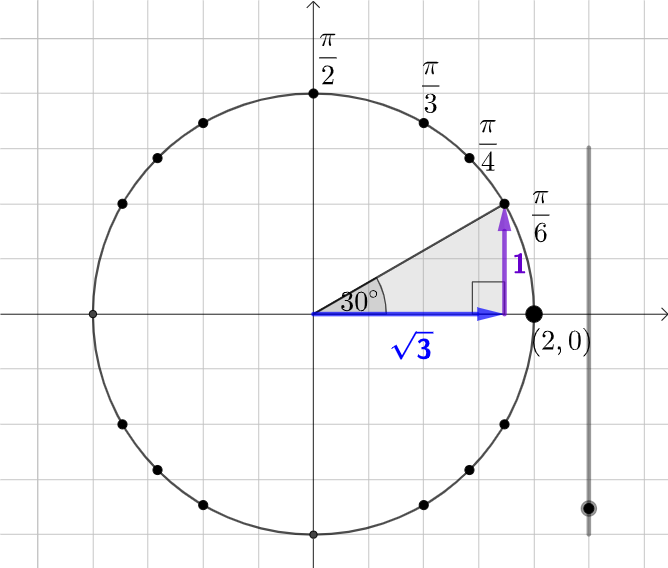
This example demonstrates how to draw a trigonometric reference circle by adjusting its radius. Key mathematical concepts include trigonometric functions, the unit circle, similar triangles, and ratios. Construction involves GeoGebra commands such as Point, Circle, Intersect, Rotate, Mirror, etc. Suitable for middle or high school mathematics education to understand basic properties of trigonometric functions and drawing techniques.
GeoGebra Commands & Parameters
Point(Ray[(0, 0), (1, 0)]) → LCircle((0, 0), L) → cIntersect(xAxis, yAxis) → AIntersect(c, xAxis, 2) → BRotate(L, π / 6, A) → CRotate(L, π / 4, A) → DRotate(L, π / 3, A) → EMirror(C, yAxis) → C'Mirror(D, yAxis) → D'Mirror(E, yAxis) → E'Mirror(E', xAxis) → E''Mirror(D', xAxis) → D''Mirror(C', xAxis) → C''Mirror(C, xAxis) → C'_{1}Mirror(D, xAxis) → D'_{1}Mirror(E, xAxis) → E'_{1}Intersect(c, xAxis, 1) → GIntersect(c, yAxis, 1) → HIf(a ≟ 1, B, a ≟ 6, E', a ≟ 7, D', a ≟ 8, C', a ≟ 9, G, a ≟ 10, C'', a ≟ 2, a ≟ 11, D'', a ≟ 12, E'', a ≟ 13, H, a ≟ 14, E'_{1}, a ≟ 15, D'_{1}, C, a ≟ 16, C'_{1}, a ≟ 3, D, a ≟ 4, E, a ≟ 5, F) → PIntersect(eq1, xAxis) → IPolygon(A, I, P) → t1, p, a_1, iSegment(A, P) → fAngle(P, I, A) → αMidpoint(A, P) → JSegment(A, P) → jSegment(A, I) → kSegment(I, P) → lAngle(I, A, P) → βVector(A, I) → uSurdText(x(I)) → text3SurdText(y(P)) → text4Vector(I, P) → vAngle(B, A, P) → γ
AI Drawing Prompt Reference
Draw a trigonometric reference circle by first creating a unit circle. Mark points on the circle that form 30°, 45°, and 60° angles with the x-axis, then reflect these points across both axes to obtain a set of symmetric points on the circle. Connect the origin to one of these points and draw the corresponding sine and cosine lines. Finally, label the angles and their corresponding trigonometric values on the sine and cosine lines.
The prompt above was compiled from the original drawing commands and is for reference only.