
Triangle Scaling Example: Exploring Side Length Changes via Geometric Transforma
Loading the math board and drawing, please wait…
In collections
PARCC Math II Unit 5 Lesson 1
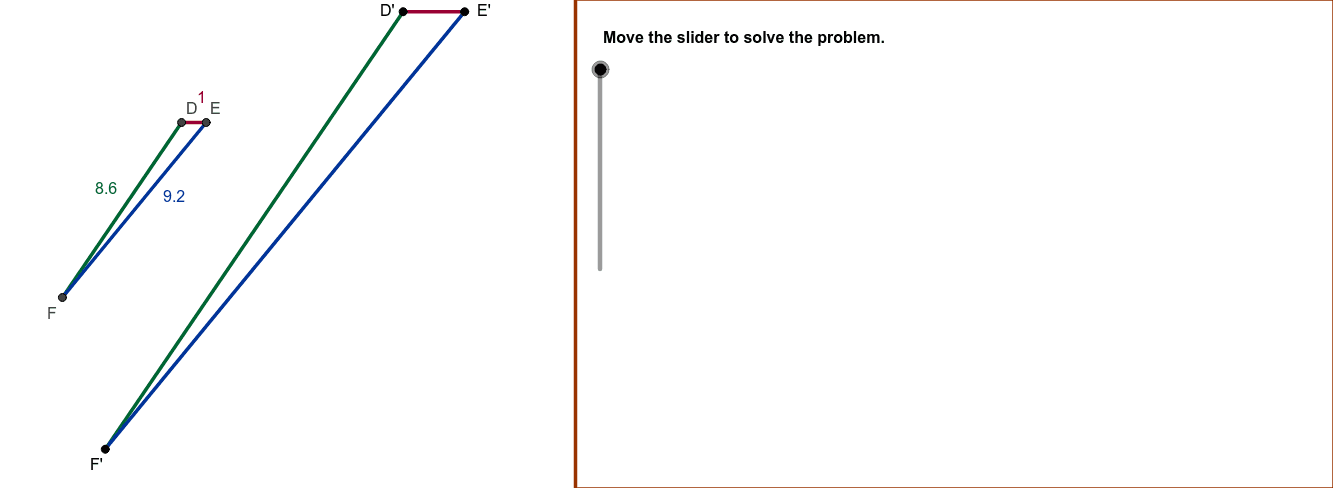
This example demonstrates how to change the side lengths of triangle D'E'F' through scaling transformation. Key mathematical concepts include similar triangles, scaling ratios, and geometric transformations. Construction involves using GeoGebra commands such as Circle, Point, Intersect, Polygon, Angle, Segment, Ray, Scale, and SliderDirections. Suitable for middle or high school mathematics courses to understand geometric transformations and proportional relationships.
GeoGebra Commands & Parameters
Circle(D, DF) → CirACCircle(D, DE) → CirABPoint(CirAB) → ECircle(E, EF) → CirBCIntersect(CirBC, CirAC) → MirrorPtC, PtC, ,Polygon((15, y(Corner[1])), Corner[2], Corner[3], (15, y(Corner[4]))) → Mask, a, b, c, dAngle(E, F, D) → EFDAngle(F, D, E) → FDESegment(D, E) → DE_1Segment(F, D) → DF_1Segment(F, E) → EF_1Segment(D', E') → D'E'Angle(E', F', D') → E'F'D'Segment(F', D') → D'F'Segment(E', F') → E'F'Angle(F', D', E') → F'D'E'Angle(D, E, F) → DEFAngle(D', E', F') → D'E'F'Ray(C, E') → RayBRay(C, F') → RayCRay(C, D') → RayASegment(D', E') → D'E'2Segment(D', F') → D'F'2Segment(E', F') → E'F'2
AI Drawing Prompt Reference
Draw a triangle and demonstrate how its side lengths change through scaling. Start by drawing two circles with the triangle's vertices as centers and corresponding side lengths as radii. Determine the third vertex at the intersection of these circles. Connect the vertices to form the triangle. Then, draw two new circles with the new triangle's vertices as centers and corresponding side lengths as radii to find the new third vertex, forming a scaled triangle. Finally, draw rays from the new triangle's vertices to the original triangle's center and connect the corresponding sides of the new triangle to show the scaling relationship and similarity.
The prompt above was compiled from the original drawing commands and is for reference only.