
Triangle Reflection and Symmetry Transformation
Loading the math board and drawing, please wait…
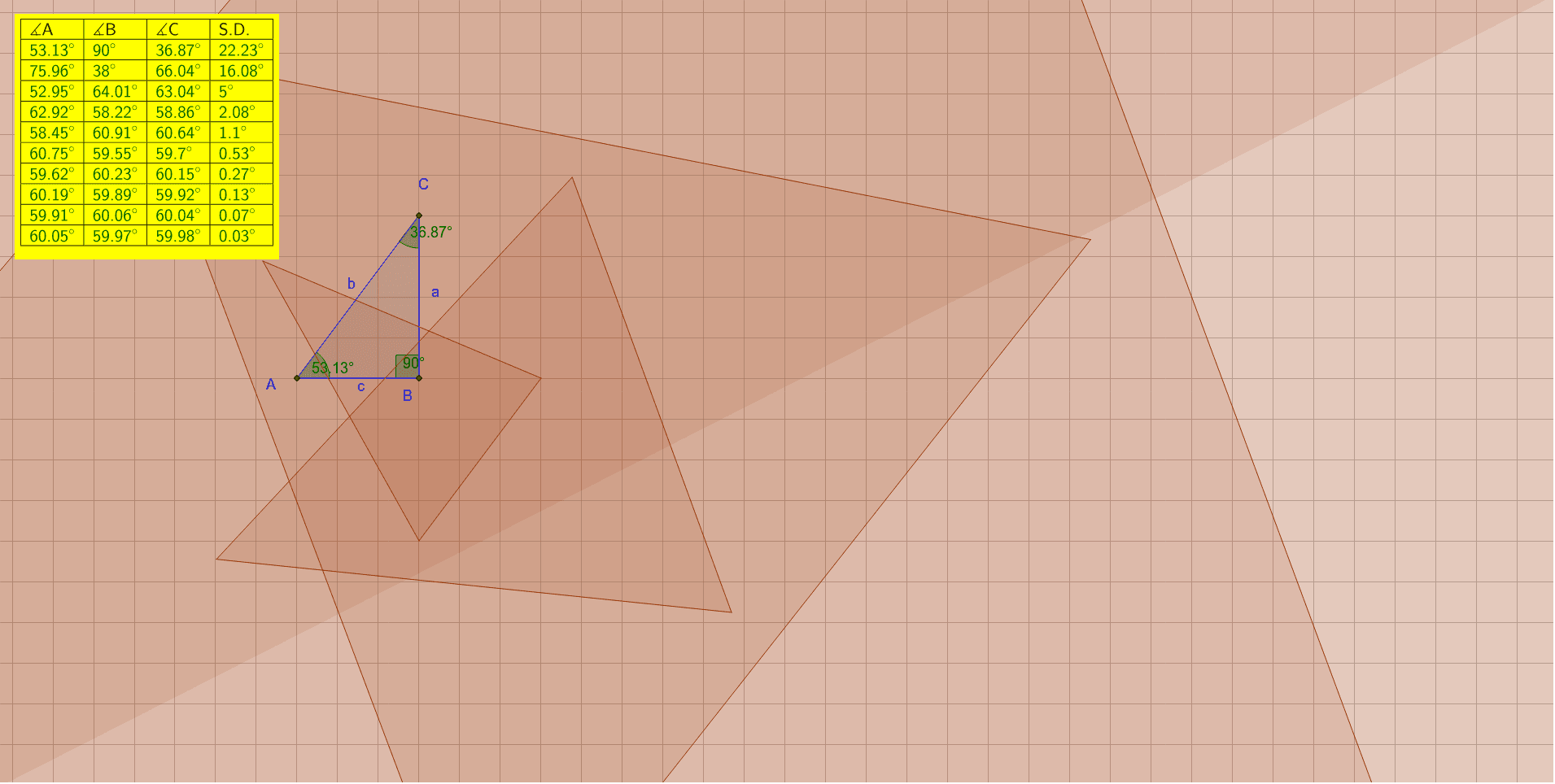
This GeoGebra example dynamically demonstrates the reflection (mirror) of a triangle across a line or axis, showing the resulting symmetric image and the coordinated changes of multiple related geometric objects such as the reflected triangle, auxiliary segments, angles, and statistical characteristics. The core mathematical concepts include reflection transformation, axial symmetry, symmetry properties, vectors in 2D, and angle relationships on the unit circle. Construction highlights: using the Polygon command to create the original triangle (vertices A, B, C), the Mirror command to generate the reflected triangle (vertices A2, B2, C2, etc.), and Segment, Angle, TableText commands to draw auxiliary segments, label angles, and produce data tables; additionally, SD (standard deviation) is involved, possibly for analyzing geometric measures before and after reflection. This example is suitable for middle school to high school students learning geometric transformations and symmetry, as well as for teachers demonstrating dynamic geometry software in class, helping students intuitively understand how reflection affects the position, shape, and metric properties of a figure.
GeoGebra Commands & Parameters
Polygon(A, B, C) → D2, E2, F2, G2Mirror(A2, F2) → A3Mirror(B2, G2) → B3Mirror(C2, E2) → C3Polygon(A3, B3, C3) → D3, E3, F3, G3Mirror(A3, F3) → A4Mirror(B3, G3) → B4Mirror(C3, E3) → C4Polygon(A4, B4, C4) → D4, E4, F4, G4Mirror(A4, F4) → A5Mirror(B4, G4) → B5Mirror(C4, E4) → C5Polygon(A5, B5, C5) → D5, E5, F5, G5Mirror(A5, F5) → A6Mirror(B5, G5) → B6Mirror(C5, E5) → C6Polygon(A6, B6, C6) → D6, E6, F6, G6Mirror(A6, F6) → A7Mirror(B6, G6) → B7Mirror(C6, E6) → C7Polygon(A7, B7, C7) → D7, E7, F7, G7Mirror(A7, F7) → A8Mirror(B7, G7) → B8Mirror(C7, E7) → C8Polygon(A8, B8, C8) → D8, E8, F8, G8Mirror(A8, F8) → A9Mirror(B8, G8) → B9Mirror(C8, E8) → C9Polygon(A9, B9, C9) → D9, E9, F9, G9Mirror(A9, F9) → A10Mirror(B9, G9) → B10Mirror(C9, E9) → C10Polygon(A10, B10, C10) → D10, E10, F10, G10Mirror(A10, F10) → A11Mirror(B10, G10) → B11Mirror(C10, E10) → C11Polygon(A11, B11, C11) → D11, E11, F11, G11SD({E2, F2, G2}) → J2SD({E3, F3, G3}) → J3SD({E4, F4, G4}) → J4SD({E5, F5, G5}) → J5SD({E6, F6, G6}) → J6SD({E7, F7, G7}) → J7SD({E8, F8, G8}) → J8SD({E9, F9, G9}) → J9SD({E10, F10, G10}) → J10SD({E11, F11, G11}) → J11Segment(A2, B2) → H2Segment(A3, B3) → H3Segment(A4, B4) → H4Segment(A5, B5) → H5Segment(A6, B6) → H6Segment(A7, B7) → H7Segment(A8, B8) → H8Segment(A9, B9) → H9Segment(A10, B10) → H10Segment(A11, B11) → H11Angle(D2) → α, β, γAngle(D2) → K2, L2, M2Angle(D3) → K3, L3, M3Angle(D4) → K4, L4, M4Angle(D5) → K5, L5, M5Angle(D6) → K6, L6, M6Angle(D7) → K7, L7, M7Angle(D8) → K8, L8, M8Angle(D9) → K9, L9, M9Angle(D10) → K10, L10, M10Angle(D11) → K11, L11, M11SD({K2, L2, M2}) → I2SD({K3, L3, M3}) → I3SD({K4, L4, M4}) → I4SD({K5, L5, M5}) → I5SD({K6, L6, M6}) → I6SD({K7, L7, M7}) → I7SD({K8, L8, M8}) → I8SD({K9, L9, M9}) → I9SD({K10, L10, M10}) → I10SD({K11, L11, M11}) → I11TableText({{F1, G1, H1, I1}, {F2, G2, H2, I2}, {F3, G3, H3, I3}, {F4, G4, H4, I4}, {F5, G5, H5, I5}, {F6, G6, H6, I6}, {F7, G7, H7, I7}, {F8, G8, H8, I8}, {F9, G9, H9, I9}, {F10, G10, H10, I10}, {F11, G11, H11, I11}}, "|_") → text1SD({K2, L2, M2}) → N2SD({K3, L3, M3}) → N3SD({K4, L4, M4}) → N4SD({K5, L5, M5}) → N5SD({K6, L6, M6}) → N6SD({K7, L7, M7}) → N7SD({K8, L8, M8}) → N8SD({K9, L9, M9}) → N9SD({K10, L10, M10}) → N10SD({K11, L11, M11}) → N11TableText({{K1, L1, M1, N1}, {K2, L2, M2, N2}, {K3, L3, M3, N3}, {K4, L4, M4, N4}, {K5, L5, M5, N5}, {K6, L6, M6, N6}, {K7, L7, M7, N7}, {K8, L8, M8, N8}, {K9, L9, M9, N9}, {K10, L10, M10, N10}, {K11, L11, M11, N11}}, "|_") → text2