
Triangle Projection on a Rolling Sphere
Loading the math board and drawing, please wait…
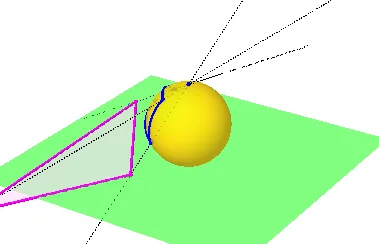
This example demonstrates the projection of a triangle onto a rolling sphere. It involves core mathematical concepts such as spherical geometry, projection transformations, and polygon construction. The construction utilizes GeoGebra commands and objects like Sphere, Plane, OrthogonalPlane, IntersectPath, PointIn, CircleArc, Point, Rotate, Line, Intersect, Segment, and Polygon. Suitable for high school and above, it serves as a tool for learning spatial geometry and projection transformations.
GeoGebra Commands & Parameters
Sphere((0, 0, 1), 1) → aPlane(yAxis, zAxis) → bPlane(xAxis, zAxis) → cOrthogonalPlane(B, zAxis) → dIntersectPath(c, d) → fIntersectPath(b, d) → gIntersectPath(c, b) → hPointIn(a) → CPointIn(a) → DCircleArc(B, C, D) → ePointIn(a) → ECircleArc(B, C, E) → kPoint(k) → FPoint(e) → GCircleArc(B, F, G) → pRotate(e, i, f) → e'Rotate(p, i, f) → p'Rotate(k, i, f) → k'Rotate(F, i, f) → F'Rotate(G, i, f) → G'Rotate(C, i, f) → C'Line(A, C') → jLine(A, F') → lLine(A, G') → mIntersect(j, xOyPlane) → HIntersect(l, xOyPlane) → IIntersect(m, xOyPlane) → JSegment(H, J) → nSegment(J, I) → qSegment(I, H) → rPolygon(H, J, I) → t1, i_1, h_1, j_1
AI Drawing Prompt Reference
Construct a triangle on a sphere's surface and project it onto the sphere. Rotate the sphere around an axis and observe the changes in the projected triangle. Finally, project the rotated triangle back onto a plane to form the final shape.
The prompt above was compiled from the original drawing commands and is for reference only.