
Triangle Maker by Melanie Palma
Loading the math board and drawing, please wait…
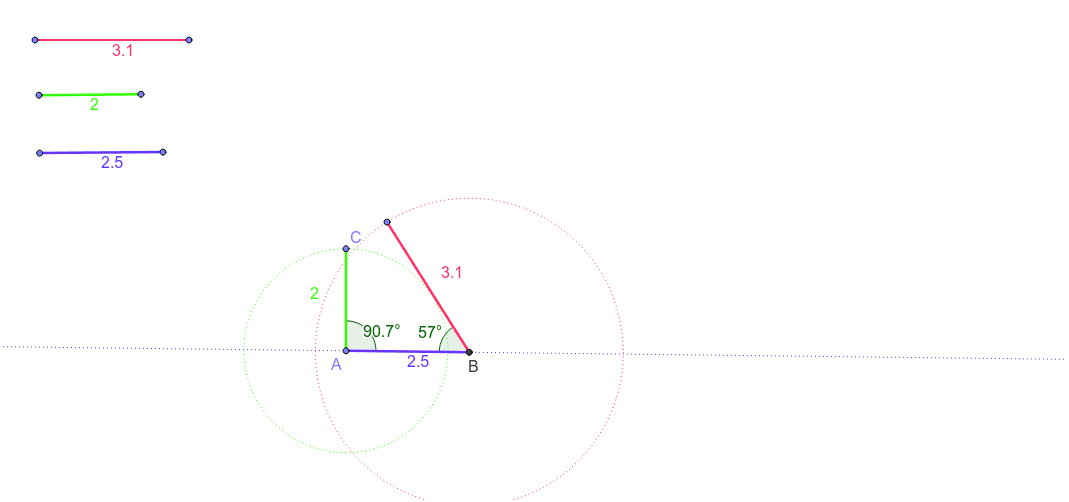
This example demonstrates how to create different combinations of triangles using GeoGebra and analyze which combinations are feasible and which are not. Key mathematical concepts include geometric construction, triangle properties, random experiments, and random variables. Construction involves using commands like Line, Point, Segment, Circle, Intersect, and Angle, along with objects such as A_1, B_1, a, C_1, D, b, E, F, c, A_2, H, d, G, I, e, J, K, f, L, M, g, A, h, B, i, k, C, j, p, N, l, α, β. Suitable for middle school or high school students to practice geometric construction and random experiment concepts.
GeoGebra Commands & Parameters
Line(A_1, B_1) → aLine(C_1, D) → bLine(E, F) → cPoint(a) → A_2Point(a) → HSegment(A_2, H) → dPoint(b) → GPoint(b) → ISegment(G, I) → ePoint(c) → JPoint(c) → KSegment(J, K) → fLine(L, M) → gPoint(g) → ACircle(A, f) → hIntersect(h, g, 2) → BSegment(A, B) → iCircle(A, e) → kPoint(k) → CSegment(C, A) → jCircle(B, d) → pPoint(p) → NSegment(B, N) → lAngle(B, A, C) → αAngle(N, B, A) → β
AI Drawing Prompt Reference
Draw three non-parallel lines, and on each line pick two points and connect them to form a segment, yielding three segments of different lengths. Then draw a new line, choose a point on it as a vertex, and draw three circles centered at this vertex with radii equal to the three segment lengths. The first circle intersects the line at another point; connect the vertex to this point to form one side. Pick a point on the second circle and connect it to the vertex to form a second side. Pick a point on the third circle and connect it to the first intersection point to form a third side. Finally, mark the angle between the two sides at the vertex, and the angle between the third side and the first side.
The prompt above was compiled from the original drawing commands and is for reference only.