
Triangle Dilation by Emma
Loading the math board and drawing, please wait…
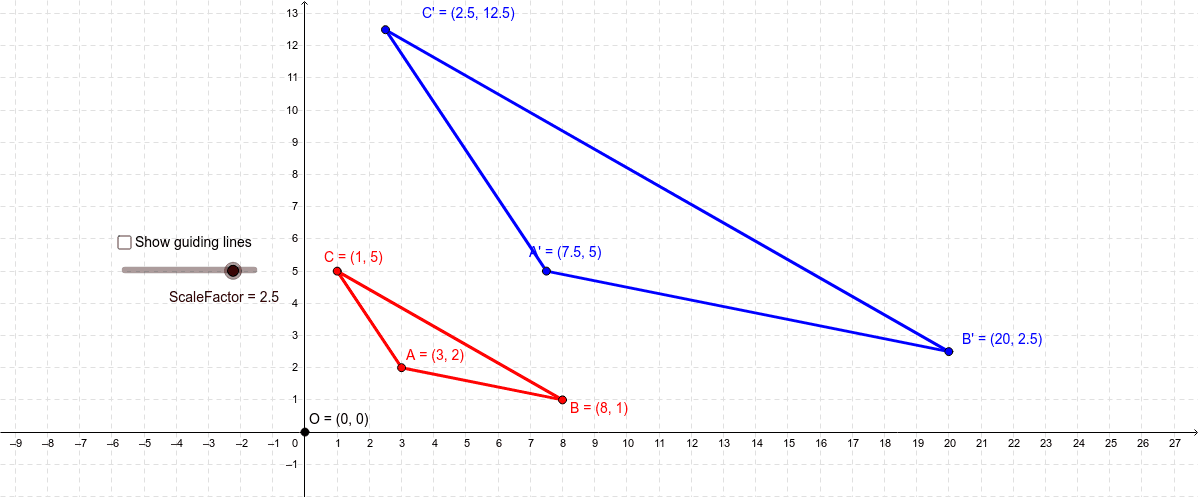
This example demonstrates the process of triangle dilation in a coordinate system, showing how the size and position of a triangle change through scaling transformations. Key math concepts include dilation, matrices, percentages, and geometric construction. It uses commands like Segment, Ray, Circle, and Intersect, along with objects such as points A, B, C, center O, and ScaleFactor. Suitable for high school students learning geometric transformations and matrix applications in graphics.
GeoGebra Commands & Parameters
Segment(A, B) → aSegment(A, C) → bSegment(C, B) → cRay(O, B) → dRay(O, A) → eRay(O, C) → fCircle(O, (ScaleFactor * Distance[O, B])) → gIntersect(g, d, 1) → B'Circle(O, (ScaleFactor * Distance[O, A])) → hIntersect(h, e, 1) → A'Circle(O, (ScaleFactor * Distance[O, C])) → kIntersect(k, f, 1) → C'Segment(C', A') → iSegment(B', C') → jSegment(B', A') → l
AI Drawing Prompt Reference
Draw a triangle in a coordinate plane, choose a center point, and draw rays from the center through each vertex. Then draw circles centered at the center with radii equal to the original vertex distances multiplied by a scale factor; the intersections of each circle with its corresponding ray give the dilated vertices. Finally connect the three new vertices to form the dilated triangle while keeping the original triangle’s sides.
The prompt above was compiled from the original drawing commands and is for reference only.