
Ocho: Ellipse and Equilateral Triangle Construction with Matrix Analysis
Loading the math board and drawing, please wait…
In collections
geometriadinamica.es
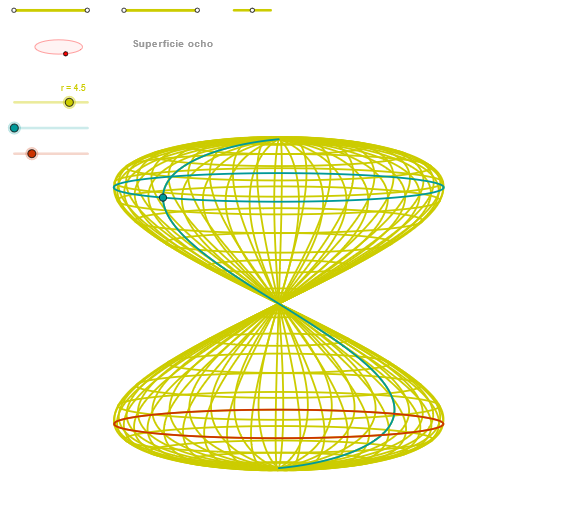
This example demonstrates the construction of an ellipse and an equilateral triangle using GeoGebra, along with matrix analysis of their geometric properties. Key mathematical concepts include ellipse equations, equilateral triangle construction, matrix transformations, and geometric transformations. The construction involves commands such as Segment, Point, OrthogonalLine, Circle, Intersect, Ellipse, Angle, CurveCartesian, and Sequence. Suitable for high school students or college undergraduates learning analytic geometry and matrix applications, useful for mathematical modeling and geometric analysis exercises.
GeoGebra Commands & Parameters
Segment(Q3, Q4) → p2Point(p2) → P3Segment(P3, Q4) → p4Point(p4) → P4Segment(Q1, Q2) → p1Point(p1) → P1Segment(P1, Q2) → p3Point(p3) → P2OrthogonalLine(C, xAxis) → zz2Circle(C, 0.62) → zz0Intersect(zz0, zz2, 1) → ZZ4Intersect(zz0, zz2, 2) → ZZ3Ellipse(ZZ3, ZZ4, 0.65) → zElipse2Point(zElipse2) → ZIntersect(zElipse2, zz2) → ZZ7, ZZ8Angle(ZZ8, C, Z) → zAngIncOrthogonalLine(C, yAxis) → zz1Intersect(zz0, zz1, 2) → ZZ2Intersect(zz0, zz1, 1) → ZZ1Ellipse(ZZ1, ZZ2, 0.65) → zElipse1Point(zElipse1) → XYIntersect(zElipse1, zz1) → ZZ5, ZZ6Angle(ZZ6, C, XY) → zAngRotSegment(Q5, Q6) → p5Point(p5) → P5Segment(ZZ5, ZZ6) → zz4Segment(ZZ7, ZZ8) → zz3Intersect(zElipse2, zElipse1, 1) → zPunto1Intersect(zElipse2, zElipse1, 4) → zPunto2Segment(zPunto1, zPunto2) → zSeg2CurveCartesian((r * (((cos(α) * sin((2 * v))) * sin(zAngRot)) + ((sin(α) * sin((2 * v))) * cos(zAngRot)))), (r * (((((-cos(α)) * sin((2 * v))) * cos(zAngRot)) * sin(zAngInc)) + (((sin(α) * sin((2 * v))) * sin(zAngRot)) * sin(zAngInc)) + (sin(v) * cos(zAngInc)))), v, v1, v2) → curva2CurveCartesian((r * ((cos(u) * sin(zAngRot)) + (sin(u) * cos(zAngRot)))), (r * ((((-cos(u)) * cos(zAngRot)) * sin(zAngInc)) + ((sin(u) * sin(zAngRot)) * sin(zAngInc)) + (sin(3.14159 / 4) * cos(zAngInc)))), u, u1, u2) → curva1CurveCartesian((r * (((cos(u) * sin((2 * (β - 3.14159 / 2)))) * sin(zAngRot)) + ((sin(u) * sin((2 * (β - 3.14159 / 2)))) * cos(zAngRot)))), (r * (((((-cos(u)) * sin((2 * (β - 3.14159 / 2)))) * cos(zAngRot)) * sin(zAngInc)) + (((sin(u) * sin((2 * (β - 3.14159 / 2)))) * sin(zAngRot)) * sin(zAngInc)) + (sin(β - 3.14159 / 2) * cos(zAngInc)))), u, u1, u2) → a1Sequence(CurveCartesian[(r * (((cos(u) * sin((2 * v))) * sin(zAngRot)) + ((sin(u) * sin((2 * v))) * cos(zAngRot)))), (r * (((((-cos(u)) * sin((2 * v))) * cos(zAngRot)) * sin(zAngInc)) + (((sin(u) * sin((2 * v))) * sin(zAngRot)) * sin(zAngInc)) + (sin(v) * cos(zAngInc)))), v, v1, v2], u, u1, u2, paso) → list2Sequence(CurveCartesian[(r * (((cos(u) * sin((2 * v))) * sin(zAngRot)) + ((sin(u) * sin((2 * v))) * cos(zAngRot)))), (r * (((((-cos(u)) * sin((2 * v))) * cos(zAngRot)) * sin(zAngInc)) + (((sin(u) * sin((2 * v))) * sin(zAngRot)) * sin(zAngInc)) + (sin(v) * cos(zAngInc)))), u, u1, u2], v, v1, v2, paso) → list1
AI Drawing Prompt Reference
On one coordinate plane, draw two perpendicular reference axes and use a common center C to define basis directions. Construct two ellipses using the intersection points determined from lines through C with the x- and y-axis directions; each ellipse is defined by its two focal points (from those intersections) and uses the same numerical parameter to shape the ellipse. Mark the key intersection points where each ellipse meets the corresponding axis and where the two ellipses intersect. From the center C, define two angles based on the rays toward these characteristic points and the chosen axis directions, treating them as rotation/inclination references. Finally, plot two parametric curves based on these angle parameters, showing their trajectories across the chosen parameter intervals (optionally as point sequences).
The prompt above was compiled from the original drawing commands and is for reference only.