
3D Statics: Geometric Simulation of Vectors and Equilibrium
Loading the math board and drawing, please wait…
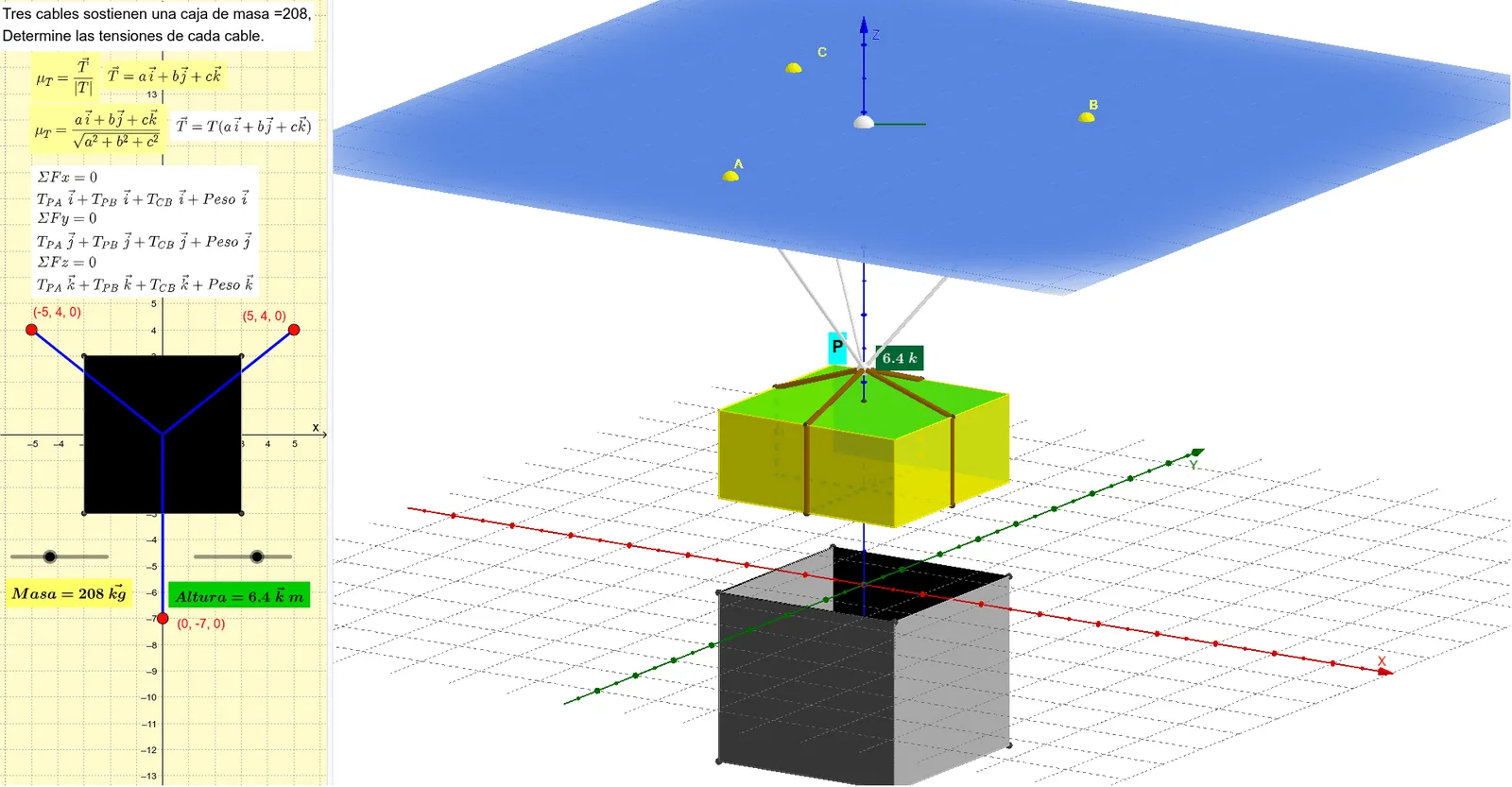
This GeoGebra example demonstrates a 3D statics setup where equilibrium ideas are visualized through the geometry of spatial vectors. By arranging directions and using vector relationships, learners can see how balance constraints can be represented in a constructed 3D configuration. Key topics include 3D vectors (direction and magnitude), vector multiplication/linear combinations, construction of right triangles for orthogonality and component extraction, and the use of matrix-style relationships and integer ratio concepts (e.g., MCM/MCD) to calibrate proportions. Construction focuses on building points, lines, segments, and planes first, then enforcing right-angle conditions via orthogonal lines and projections. Circles and polygonal/3D solid elements (a prism) help define the spatial scaffold, while intersections and midpoints determine key vector endpoints and reference directions. The build uses GeoGebra commands such as Intersect, Circle, OrthogonalLine, Line, Prism, Point, Plane, Midpoint, Segment, and Polygon, along with multiple labeled points and dimension-style objects (e.g., ALTURA/ANCHO) to control the geometry. Suitable for secondary to early university students studying vectors in 3D and applying them to statics equilibrium and geometric modeling.
GeoGebra Commands & Parameters
Intersect(yAxis, xAxis) → A_3Circle(A_3, ANCHO) → cIntersect(c, yAxis) → B_3, C_3Intersect(c, xAxis) → D, EOrthogonalLine(C_3, yAxis) → fOrthogonalLine(B_3, yAxis) → gOrthogonalLine(D, xAxis) → hOrthogonalLine(E, xAxis) → iIntersect(h, f) → FIntersect(i, f) → GIntersect(h, g) → ILine(I, G) → kLine(I, zAxis) → lLine(F, zAxis) → mLine(G, zAxis) → nLine(H, zAxis) → pLine(F, A_3) → jIntersect(g, j) → JCircle(H, ALTURA, xAxis) → dIntersect(p, d) → K, LLine(J, n) → qLine(H, j) → rIntersect(r, m) → OIntersect(q, r) → PLine(H, k) → sIntersect(s, l) → QIntersect(s, n) → RLine(K, j) → tIntersect(t, m) → SIntersect(q, t) → TLine(K, k) → aIntersect(a, l) → UIntersect(n, a) → VPrism(Q, P, R, O, U) → b, W, aristaPQ, aristaPR, aristaOR, aristaOQ, aristaQU, aristaPW, aristaRZ, arista1, aristaUW, aristaWZ, Z, arista3, arista2, A_1, caraOQPR, caraPQUW, caraPRZW, cara2, cara1, cara3Point(zAxis) → MPlane(M, xOyPlane) → eMidpoint(O, Q) → NMidpoint(S, U) → B_1Segment(B_1, N) → f_1Segment(B_1, N) → g_1Midpoint(Q, P) → C_1Midpoint(U, T) → D_1Segment(C_1, D_1) → i_1Midpoint(P, R) → E_1Midpoint(T, V) → F_1Segment(E_1, F_1) → j_1Midpoint(R, O) → G_1Midpoint(G, F) → H_1Midpoint(V, S) → I_1Segment(G_1, I_1) → k_1Segment(C_1, G_1) → q_1Segment(E_1, N) → r_1Line(K_1, zAxis) → s_1Line(M_1, zAxis) → t_1Line(L_1, t_1) → a_1Intersect(yAxis, xAxis) → N_1Segment(K_1, N_1) → b_1Segment(N_1, L_1) → c_1Segment(N_1, M_1) → d_1Line(M, b_1) → e_1Intersect(e_1, s_1) → O_1Intersect(s_1, e_1) → CLine(M, d_1) → f_2Intersect(t_1, f_2) → ALine(M, c_1) → g_2Intersect(g_2, a_1) → BCircle(K, 1, yAxis) → c_2Intersect(zAxis, c_2) → J_1, S_1Segment(B_1, J_1) → l_1Segment(D_1, J_1) → m_1Segment(F_1, J_1) → n_1Segment(I_1, J_1) → p_1Segment(J_1, A) → h_2Segment(J_1, C) → i_2Segment(J_1, B) → j_2Segment(F, G) → k_2Segment(J, G) → l_2Segment(J, I) → m_2Segment(I, F) → n_2Intersect(l_2, m_2) → T_1Polygon(F, G, T_1, I) → polígono1, f_3, g_3, t_2, i_3Point(zAxis) → U_1Line(U_1, s) → p_2Line(U_1, r) → q_2Intersect(q, q_2) → V_1Intersect(p_2, n) → W_1Intersect(m, q_2) → Z_1Intersect(m, q_2) → A_2Intersect(p_2, l) → B_2Intersect(q, q_2) → C_2Polygon(F, I, B_2, A_2) → polígono2, f_4, i_4, b_2, a_2Polygon(A_2, W_1, C_2, B_2) → polígono3, a_3, w_1, c_3, b_3Intersect(c_3, w_1) → D_2Polygon(C_2, B_2, I, T_1) → polígono4, c_4, b_4, i_5, t_3Polygon(G, F, A_2, W_1) → polígono5, g_4, f_5, a_4, w_2Polygon(T_1, G, W_1, C_2) → polígono6, t_4, g_5, w_3, c_5
AI Drawing Prompt Reference
Draw a 3D statics model with two perpendicular planes and a rectangular prism. Start by creating the x-axis, y-axis, and z-axis. Then, create a circle c on the x-axis and find the intersection points B_3 and C_3 with the y-axis. Construct perpendicular lines f and g to the y-axis, and perpendicular lines h and i to the x-axis. Use intersection points F, G, I, J, K, L, M, N, O, P, Q, R, S, T, U, V, W to build the rectangular prism and determine its vertices and edges. Finally, use midpoints and line segments to construct auxiliary lines to ensure the model's balance and symmetry.
The prompt above was compiled from the original drawing commands and is for reference only.