
Stereographic Projection Demonstration
Loading the math board and drawing, please wait…
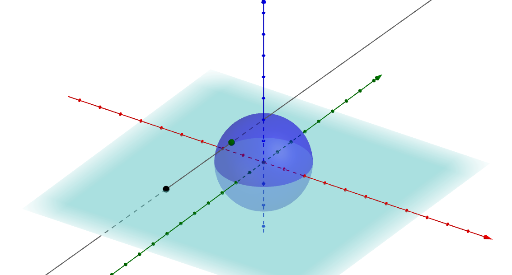
This example illustrates the stereographic projection from a unit sphere onto a plane. It involves core mathematical concepts like spherical geometry, projection transformations, and analytical geometry. Key GeoGebra commands used in its construction include Intersect, Sphere, PointIn, Line, and Surface. Suitable for high school students and mathematics enthusiasts learning about spatial geometry and projection transformations.
GeoGebra Commands & Parameters
Intersect(xAxis, yAxis) → ASphere(A, 1) → a_1PointIn(a_1) → BLine((0, 0, 1), Vector[(x(B), y(B), -1 + z(B))]) → fSurface(((sqrt(1 - u^(2)) * cos(v)) * (1 + (u / (1 - u) * a))), ((sqrt(1 - u^(2)) * sin(v)) * (1 + (u / (1 - u) * a))), u - (u * a), u, -1, 1, v, 0, (2 * π)) → b
AI Drawing Prompt Reference
Draw a unit sphere and a plane to illustrate the stereographic projection from the sphere onto the plane. Start by finding the intersection of the coordinate axes to determine the sphere's center, then draw the sphere. Select a point on the sphere and connect it to the origin to form a projection line. Finally, use parametric equations to plot the surface of the stereographic projection, which wraps around the projection line, demonstrating the projection process.
The prompt above was compiled from the original drawing commands and is for reference only.