
Triangle Centroid Demo
Loading the math board and drawing, please wait…
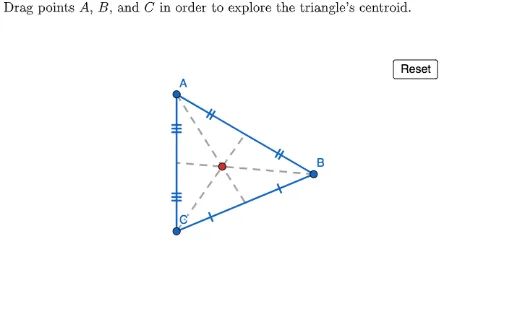
This example demonstrates how to construct the centroid of a triangle using GeoGebra. Key math concepts include triangle centroid, midpoints, medians, and polygon construction. It uses commands like Polygon, PointIn, Segment, Midpoint, LaTeX, and Centroid. Suitable for middle school and above students learning geometric constructions and centroid properties.
GeoGebra Commands & Parameters
Polygon({(-10, -10), (-10, 10), (10, 10), (10, -10)}) → viewBoxPointIn(viewBox) → APointIn(viewBox) → BPointIn(viewBox) → CSegment(A, B) → ABSegment(C, A) → ACSegment(C, B) → BCMidpoint(BC) → midpointBCSegment(A, midpointBC) → medianASegment(B, midpointBC) → BtoMidpointBCSegment(C, midpointBC) → CtoMidpointBCLaTeX("\text{Drag points \(A\), \(B\), and \(C\) in order to explore the triangle's centroid.}") → TEXTMidpoint(A, C) → midpointACMidpoint(A, B) → midpointABSegment(B, midpointAC) → medianBSegment(C, midpointAB) → medianCSegment(A, midpointAC) → AtoMidpointACSegment(A, midpointAB) → AtoMidpointABSegment(C, midpointAC) → CtoMidpointACSegment(B, midpointAB) → BtoMidpointABCentroid(Polygon[A, B, C]) → centroid
AI Drawing Prompt Reference
Draw a quadrilateral and select three vertices to form a triangle. Illustrate the three medians and the centroid of the triangle. Allow dragging the vertices to explore how the centroid moves with the medians and midpoints.
The prompt above was compiled from the original drawing commands and is for reference only.