
Triangle Area Calculation Demo
Loading the math board and drawing, please wait…
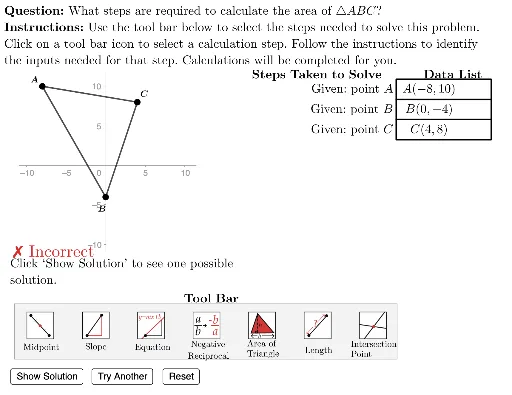
This example demonstrates how to dynamically calculate the area of a triangle using GeoGebra. Core math concepts include triangle area formulas, vector operations, and coordinate geometry. The construction utilizes commands and objects like Area, Polygon, Length, UnitVector, Zip, TableText, and LaTeX, showcasing area changes through sliders and dynamic points. Suitable for middle school and above students to understand area calculation methods and geometric construction techniques.
GeoGebra Commands & Parameters
Element(G4, caseNum) → A4Element(G3, caseNum) → A3Area(Polygon[{A3, A4, A5}]) → answerPolygon({DataListFrameAnchor, DataListFrameAnchor + (12 * u), DataListFrameAnchor + (12 * u) - vHeight, DataListFrameAnchor - vHeight}) → ValueFrameTemplateLength(dTypes) → numStepsSequence(Translate[ValueFrameTemplate, Vector[(-((vHeight * i)))]], i, 0, numSteps - 1) → ValueFramesSequence((-10, -22) + ((3.5 * i) * u), i, 0, 14) → iconAnchorsSequence(Polygon[Element[iconAnchors, i], Element[iconAnchors, i + 1], 4], i, 1, (2 * Length[iconAnchors]), 2) → iconFramesPolygon({(left, bottom), (left, top), (right, top), (right, bottom)}) → viewboxPolygon({ToolAnchor - (2 * v) - u, ToolAnchor + (5 * v) - u, ToolAnchor + (5 * v) + ((2.3 + (Length[iconAnchors] * 3)) * u), ToolAnchor - (2 * v) + ((2.3 + (Length[iconAnchors] * 3)) * u)}) → toolBarUnitVector(Vector[A3, A4]) → uABElement(iconFrames, currentAction) → iconHighlighterElement(ValueFrames, 1) → vFrame1Element(ValueFrames, 2) → vFrame2Element(ValueFrames, 3) → vFrame3Element(ValueFrames, 4) → vFrame4Element(ValueFrames, 5) → vFrame5Element(ValueFrames, 6) → vFrame6Element(ValueFrames, 7) → vFrame7Zip(Element[ValueFrames, A], A, selectedList) → highlightedItemsTableText({dDisplay}, "vc") → valueTblTableText({Join[{{"\phantom{find the equation of a line through (-1,-3) with slope -5}"}, dSteps}]}, "vr") → stepsTableLaTeX((((("\text{\textbf{Question: }" * QUESTION) * "\\\textbf{Instructions: }") * INSTRUCTIONS) * "}")) → allInstrucPolygon({A3, A4, A5}) → D3Element(ValueFrames, 8) → vFrame8Element(ValueFrames, 9) → vFrame9Element(ValueFrames, 10) → vFrame10
AI Drawing Prompt Reference
Create a dynamic visualization showing how to calculate the area of a triangle using vectors and coordinate geometry. Include a triangle with adjustable points and sliders to change its size, dynamically updating the area calculation. Display the area result and calculation steps in separate text boxes. The composition should feature a main triangle, several parallelograms generated by translating the triangle's vertices, and a table explaining the steps.
The prompt above was compiled from the original drawing commands and is for reference only.