
Trapezoid Area Construction
Loading the math board and drawing, please wait…
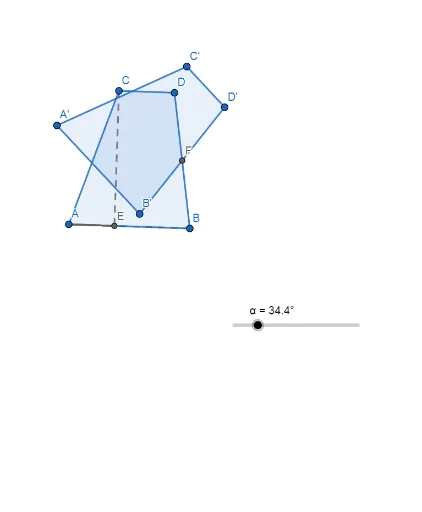
This GeoGebra construction dynamically demonstrates the derivation of the trapezoid area formula. It shows how a trapezoid can be transformed into an equal-area rectangle through rotation, making the formula S = (base1 + base2) × height / 2 visually intuitive. Core mathematical concepts include trapezoids, area, geometric transformations (rotation), midpoints, parallel lines, and incircles. The construction uses commands such as Segment to create the trapezoid sides, OrthogonalLine to construct the height, Point and Intersect to define key vertices, Polygon to form the shape, Midpoint to locate the midpoint, and Rotate to rotate part of the trapezoid 180° to form a rectangle. Objects include A, B, C, D, E, F, q1, and their rotated counterparts. This is ideal for middle school geometry lessons, helping students grasp the area formula through hands-on exploration, and is also useful for teacher demonstrations or student self-study.
GeoGebra Commands & Parameters
Segment(A, B) → fOrthogonalLine(C, f) → gOrthogonalLine(C, g) → hPoint(h) → DIntersect(f, g) → EPolygon(A, B, D, C) → q1, a, b, d, cSegment(A, E) → iSegment(E, A) → jSegment(C, E) → kSegment(A, E) → lMidpoint(D, B) → FRotate(A, (-(45°)), F) → A'Rotate(B, (-(45°)), F) → B'Rotate(D, (-(45°)), F) → D'Rotate(C, (-(45°)), F) → C'Polygon(A', B', D', C') → q1', a', b', d', c'