
Trapezoid Area by Steve Phelps
Loading the math board and drawing, please wait…
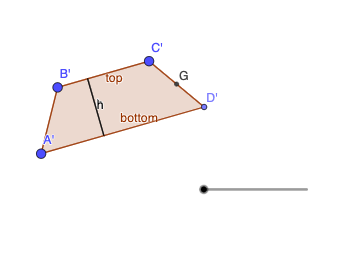
This example demonstrates the calculation of a trapezoid's area. Key mathematical concepts include geometric mean and trigonometry. Using GeoGebra commands such as Segment, Line, Point, and Polygon, a trapezoid is constructed and its area is calculated. Suitable for middle school and above students to learn geometric construction and area calculation.
GeoGebra Commands & Parameters
Segment(B, C) → fLine(A, f) → gPoint(g) → DPolygon(A, B, C, D) → q1, a, b, c, dPoint(d) → EOrthogonalLine(E, b) → hIntersect(h, b) → FSegment(E, F) → iMidpoint(c) → GRotate(A, (-((180° * e))), G) → A'Rotate(B, (-((180° * e))), G) → B'Rotate(C, (-((180° * e))), G) → C'Rotate(D, (-((180° * e))), G) → D'Polygon(A', B', C', D') → q1', a', b', c', d'Rotate(E, (-((180° * e))), G) → E'Rotate(F, (-((180° * e))), G) → F'Segment(E', F') → i'
AI Drawing Prompt Reference
Draw a trapezoid. First, draw a line segment as the base. Then, draw a line segment parallel to the base as the top base. Next, draw two lines connecting the top and bottom bases to form the trapezoid. When calculating the area, use concepts like geometric mean and trigonometry. Ensure the trapezoid shape is correct and the lines are clear.
The prompt above was compiled from the original drawing commands and is for reference only.