
Trapezium Area Calculation
Loading the math board and drawing, please wait…
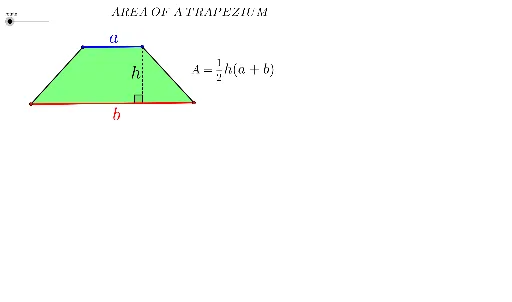
This example demonstrates the dynamic calculation of a trapezium's area. It involves core mathematical concepts such as trapezoid definition, area formula, median line properties, and coordinate geometry. GeoGebra commands like Segment, Line, Point, Polygon, Midpoint, Rotate, OrthogonalLine, Intersect, If, and Angle are used in the construction. It is suitable for middle school students and above to learn geometric area calculations and function applications, ideal for classroom teaching or self-study.
GeoGebra Commands & Parameters
Segment(A, B) → a_2Line(C, a_2) → b_2Point(b_2) → DPolygon(A, C, D, B) → P, a_1, a, d, bMidpoint(D, B) → ERotate(A, (-rotate), E) → A'Rotate(C, (-rotate), E) → C'Rotate(D, (-rotate), E) → D'Rotate(B, (-rotate), E) → B'Polygon(A', C', D', B') → P', a', c', d', b'Line(A, B) → eOrthogonalLine(D, e) → fIntersect(f, e) → FSegment(A, F) → cMidpoint(B', A') → GMidpoint(D', C') → HIf(rotate ≥ 0°, H) → IIf(rotate > 0°, H) → JIf(rotate > 0°, G) → KSegment(D, F) → hAngle(D, F, A) → βMidpoint(a_2) → LMidpoint(h) → MSegment(A, D) → gPolygon(A, C, D) → poly1, d_1, a_3, c_1Polygon(A, D, B) → poly2, b_1, a_4, d_2
AI Drawing Prompt Reference
Draw a trapezoid ABCD with A and B as the endpoints of the bottom base and C and D as the endpoints of the other side. First, draw segment AB, then draw a perpendicular line from D to AB, intersecting at point F. Next, find the midpoint E of AB and rotate trapezoid ABCD around E to get A'B'C'D'. Then, find the midpoints G and H of A'B' and D'F respectively, and determine the positions of H and G based on the rotation angle. Finally, draw segment DF and calculate the angle ∠DFA.
The prompt above was compiled from the original drawing commands and is for reference only.